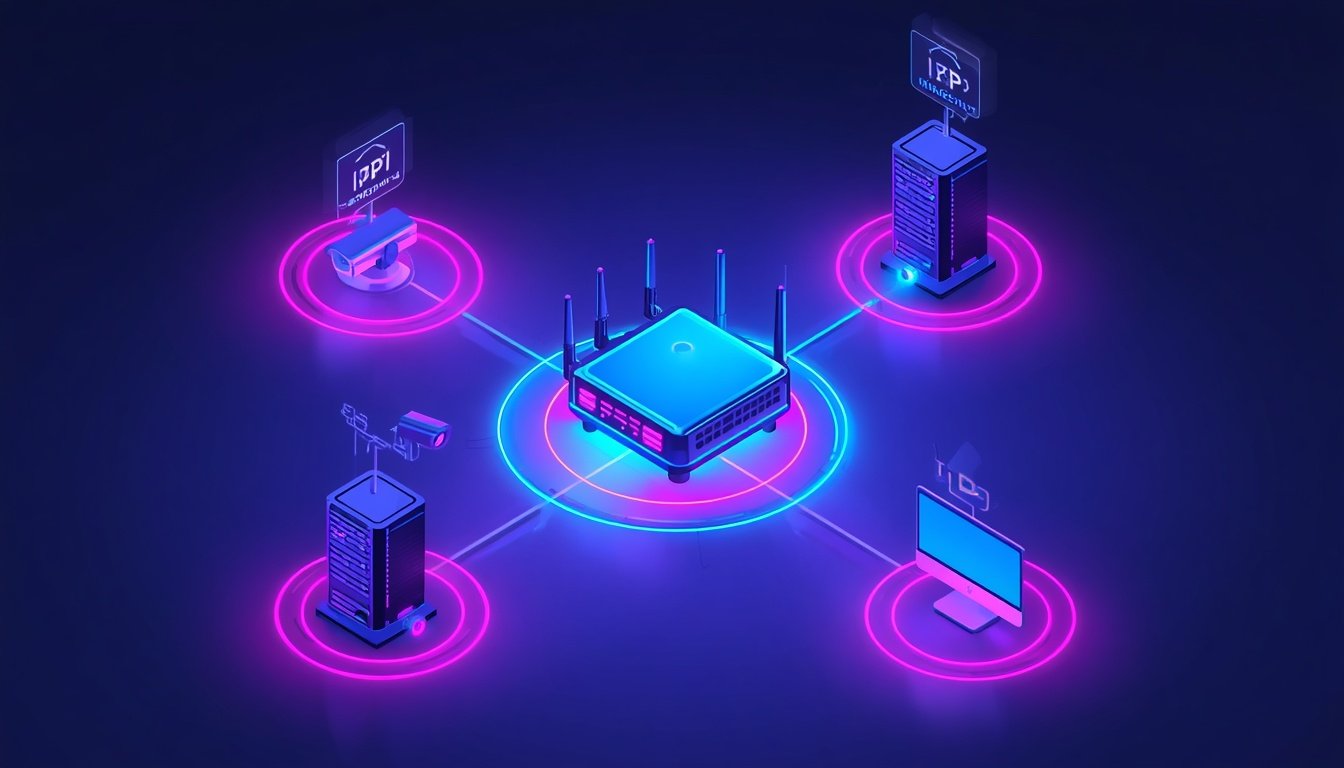
Your CCTV app suddenly cannot find your cameras. Your home server drops off the map every few days. Your remote desktop connection refuses to reconnect after a router restart.
In almost every case, the culprit is identical: your device uses a dynamic IP address that changed overnight, causing your previous setup to point to an invalid target. Understanding what is static IP, and when to implement one, resolves this issue permanently.
Quick Answer Box
A static IP is a fixed, manually assigned address that never changes, unlike a dynamic IP that a router reassigns periodically. It is used for web servers, CCTV systems, remote desktop, and VPN endpoints, where another system must reach the same device repeatedly. A static IP does not increase internet speed.
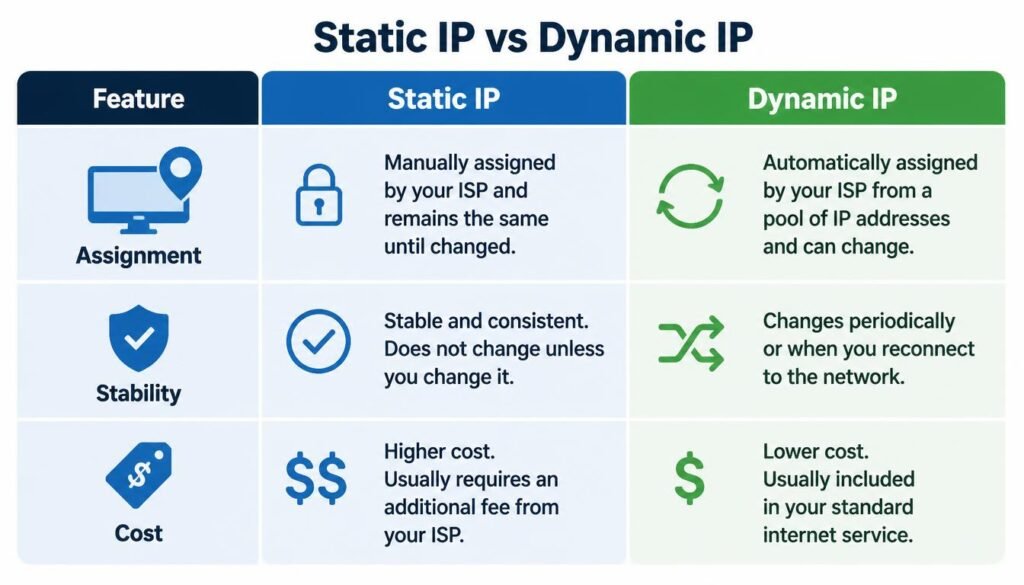
Static IP vs Dynamic IP: Comparison Table
| Parameter | Static IP | Dynamic IP |
| Address Assignment | Manually configured or reserved by router | Automatically assigned by DHCP server |
| Stability & Persistence | Remains identical across reboots | Changes after lease expiry or router restarts |
| Cost Profile | Usually a paid ISP monthly add-on | Free with standard internet plans |
| Security Profile | Predictable target requiring firewall rules | Dynamic rotation provides passive obscurity |
| Ideal Use Case | Web servers, CCTV, remote desktop, gaming servers | General browsing, streaming, mobile devices |
| ISP Setup | Requires static WAN provision or MAC reservation | Enabled automatically by default |
What Is Static IP Address: Definition and Real World Examples
A static IP address is a permanent network identifier assigned once that remains constant until manually altered. This protocol functions across two distinct network levels:
- Local Private Level: A device holds an internal address like 192.168.1.50 inside the local subnet.
- Public WAN Level: An ISP assigns a persistent external gateway address to your entire home network.
Confusing these two layers is a frequent setup mistake. Most users searching what is static IP address either have a local device losing its LAN location or require an externally accessible service.
+-----------------------------------------------------------------+
|                        PUBLIC INTERNET                          |
|                  (Assigned Public Static IP)                    |
+-----------------------------------------------------------------+
                                |
                                v
                    +-----------------------+
                    |  ISP Router Gateway   |
                    +-----------------------+
                                |
        +-----------------------+-----------------------+
        |                                               |
        v                                               v
+-----------------------+               +-----------------------+
|  CCTV System (Static) |               | Standard PC (Dynamic) |
|   192.168.1.50        |               |   192.168.1.105       |
+-----------------------+               +-----------------------+
Real-world applications clarify this need clearly:
- CCTV Surveillance: Mobile apps require a stable connection path rather than searching for new leases.
- Web & Mail Servers: Visitors and public DNS records require a fixed domain resolution point.
- Remote Desktop Access: Software protocols connect directly to dedicated numerical endpoints.
- Hosted Game Servers: Players require a constant destination IP to reconnect without re-configuration.
How Static IP Works Over WiFi and Local DHCP Reservation
Understanding what is static IP in WiFi is essential because most modern hardware connects wirelessly. On a wireless network, fixed addressing is established using two main approaches:
1. Device-Side Manual Configuration
You can disable automatic DHCP inside Windows, macOS, Android, or iOS adapter menus. You manually input your IP address, subnet mask, default gateway, and DNS servers.
However, manual entries risk address collisions if the router assigns that same IP to another device through automatic 192.168 static IP assignment pools.
If you need step-by-step guidance on locating these menus, our guide on checking local ip configuration settings breaks down the exact steps across all operating systems.
2. Router-Side DHCP Reservation (Recommended)
The safer method involves setting up a DHCP reservation inside your router settings. The router binds a specific internal IP to your device’s physical MAC address.
The device still requests an IP automatically, but the router always delivers the reserved address. This eliminates manual configuration errors and survives full system resets.
If IP collisions cause persistent drops, our guide on troubleshooting wifi connection issues provides simple steps to resolve local assignment errors.
Physical placement also affects address stability. If your hardware drops wireless signals constantly, it appears offline regardless of correct addressing.
When fixed devices disconnect at random, reviewing our guide on improving weak wifi signal coverage helps fix physical dead zones and channel interference.
Static IP Stormfiber and ISP Configuration in Pakistan
Internet service providers package static routing differently based on regional infrastructure. Service setups like Static IP Stormfiber offer a clear real-world example of public WAN allocation.
- Paid Service Add-on: StormFiber provides static IP routing as a supplemental service rather than a default feature.
- Helpline Provisioning: Users activate the service by contacting customer support or visiting a regional service center.
- WAN Interface Assignment: Once activated, the fixed gateway binds automatically to the router WAN port or requires manual entry of static ISP parameters.
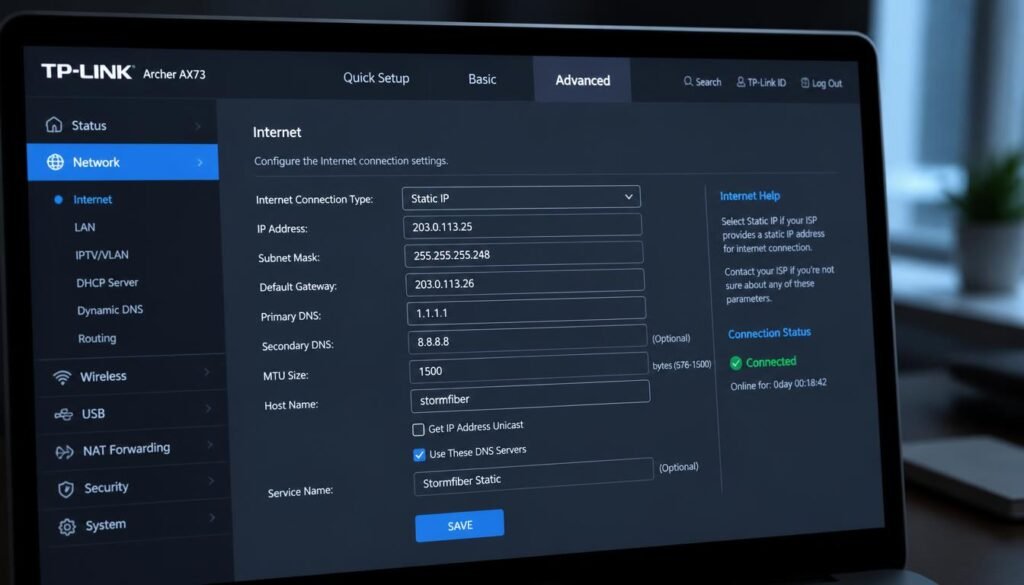
This structure is standard across most global fiber providers. Running external servers or CCTV systems remotely requires factoring in setup timelines and monthly add-on fees before deployment.
Is Static IP Safe? Security Analysis and Exposure Risks
A common concern when configuring network endpoints is is static IP safe. A static assignment is neither inherently dangerous nor automatically protected; it simply alters your risk exposure.
Because a static address never changes, automated port scanners can map open vulnerabilities over time. Dynamic addresses change periodically, providing minor passive obscurity against repetitive scans.
DYNAMIC IP:   [192.168.1.12] --> Rotates Regularly --> Scanners Lose Target
STATIC IP:    [192.168.1.50] --> Stays Permanent  --> Target Remains Constant (Requires Firewall)
You can mitigate exposure risks easily using standard defensive measures:
- Maintain an active router firewall with default inbound rules.
- Disable remote router management options over public WAN ports.
- Enforce strong passwords and multi-factor authentication on exposed services.
- Update router and connected device firmware regularly.
When opening ports for local servers, review our guide on configuring custom router administration settings to restrict unnecessary port ranges.
Static IP for Gaming: Impact on Internet Speed and Latency
Searching for a static IP for gaming is popular among players assuming a fixed address boosts connection performance. It does not.
Static IP internet speed is identical to dynamic connection performance. ISPs do not adjust bandwidth limits, download rates, or upload capacity based on your IP assignment method.
However, static addressing offers specific functional benefits for gamers:
- Stable Port Forwarding: Prevents forwarded console ports from breaking when local IPs change.
- Consistent NAT Types: Helps maintain an Open NAT status for seamless multiplayer lobby hosting.
- Dedicated Server Hosting: Allows clan members to bookmark your server without requiring updated details after reboots.
For players seeking lower ping times and reduced packet loss, our guide on fixing slow network performance on gaming consoles details effective DNS and hardware adjustments.
How to Set Up a Static IP on Your Router or Device
Setting up a fixed network address correctly prevents IP collisions. Follow these universal steps to reserve an address safely via your router:
- Access Router Dashboard: Open your web browser and navigate to your gateway address (typically 192.168.1.1 or 192.168.0.1).
- Locate DHCP Reservation: Navigate to Advanced Settings > LAN Settings > DHCP Reservation.
- Identify Device MAC Address: Find your target device in the connected client list and copy its physical MAC address.
- Bind IP Address: Enter the MAC address into the reservation table and assign your desired static IP.
- Apply and Restart: Save your settings and restart the target device to obtain the newly reserved lease.
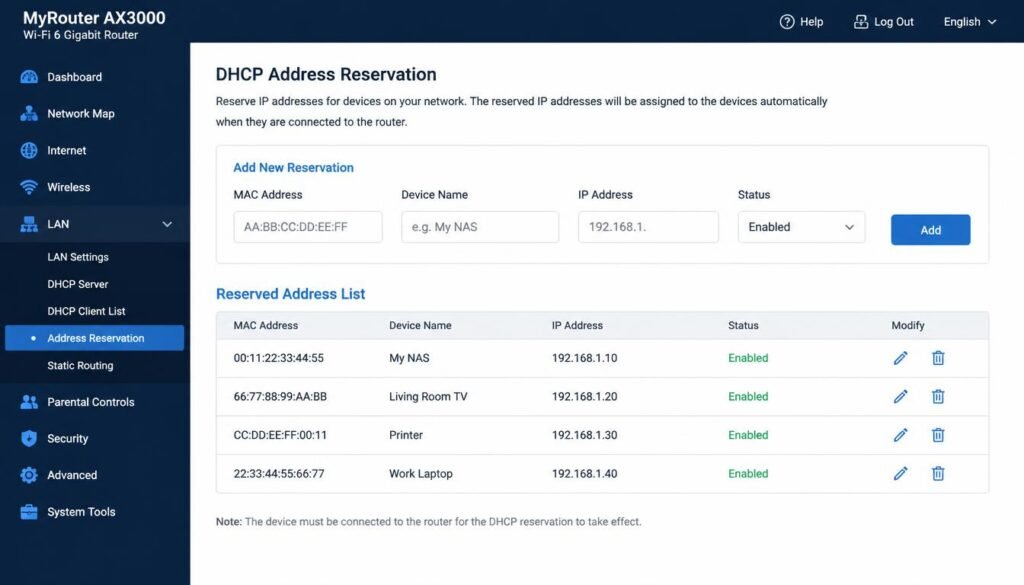
If a device fails to hold its assigned address, outdated network drivers or corrupt lease caches are usually responsible.
Frequently Asked Questions
How do I know my IP is static?
Check your network settings menu or router status page. If the configuration states Manual or Static instead of DHCP, your address is static. Restarting your router to see if your IP changes also confirms it.
Does static IP increase internet speed?
No. Static IP addresses do not alter your bandwidth or latency. Any performance changes noticed after installation usually stem from simultaneous router or plan upgrades.
Is a static IP better for gaming?
A static IP does not lower your ping, but it maintains stable port forwarding rules and Open NAT configurations without needing constant re-setup.
Is 192.168 a static IP?
Not automatically. Addresses starting with 192.168 are private local network addresses. They can be assigned dynamically by DHCP or set statically by the user.
What is static IP address?
A static IP address is a permanent numerical identifier assigned to a device or network that remains constant across reboots and reconnections.
What is my static IP?
Your static IP is listed inside your device Network Adapter Settings (for local private IPs) or on your router WAN Status Page (for public static IPs).
What is static IP in WiFi?
It means a wireless device connects to a local network using a fixed internal IP address assigned manually or reserved via router DHCP settings.
What is static ip used for?
Static IPs are used for hardware that requires reliable inbound connections, such as CCTV cameras, web servers, remote desktop access, and VPN endpoints.
What is static ip example?
An internal security camera assigned 192.168.1.100 permanently on a home LAN is a local static IP example. A web server using 203.0.113.45 is a public static IP example.
Is static IP safe?
Yes, provided you use proper security steps. Because static IPs do not change, using a strong firewall and updated firmware protects your network from automated scanning risks.
Final Thoughts
A static IP solves one primary issue: maintaining a predictable target address over time. It is essential for CCTV systems, self-hosted web servers, and remote desktop tools.
Before requesting a public static IP from your service provider, verify your specific requirements. Local connection issues can usually be solved for free using router-level DHCP reservations.
If you are setting up network equipment on desktop systems, our guides on viewing saved wifi passwords on windows and measuring desktop and laptop screen sizes provide additional setup assistance.
To understand network privacy and tracking boundaries, our breakdown on checking privacy logs on local wifi connections explains what logs are visible to network administrators.
Finally, if you manage network diagnostic files or backup logs, our guide on changing windows file extensions safely helps you adjust file formats without risking data corruption.