
Your video call freezes, a page will not load, and you are watching a spinner for the third time this hour. If you are searching for how to fix slow internet, you are not dealing with a mystery. Most slowdowns trace back to one of five places: your provider, your router, your WiFi signal, a single misbehaving device, or the plan you are paying for. This guide walks through each layer in order, starting with the checks that take thirty seconds and ending with the ones that require a new plan, so you can find your specific cause fast.
Quick Answer
To fix slow internet, first check whether your provider has an outage, then run a speed test against your plan. Restart your modem and router, move closer to the router or switch to the 5 GHz band, disconnect unused devices, and update your browser before assuming the plan is inadequate.
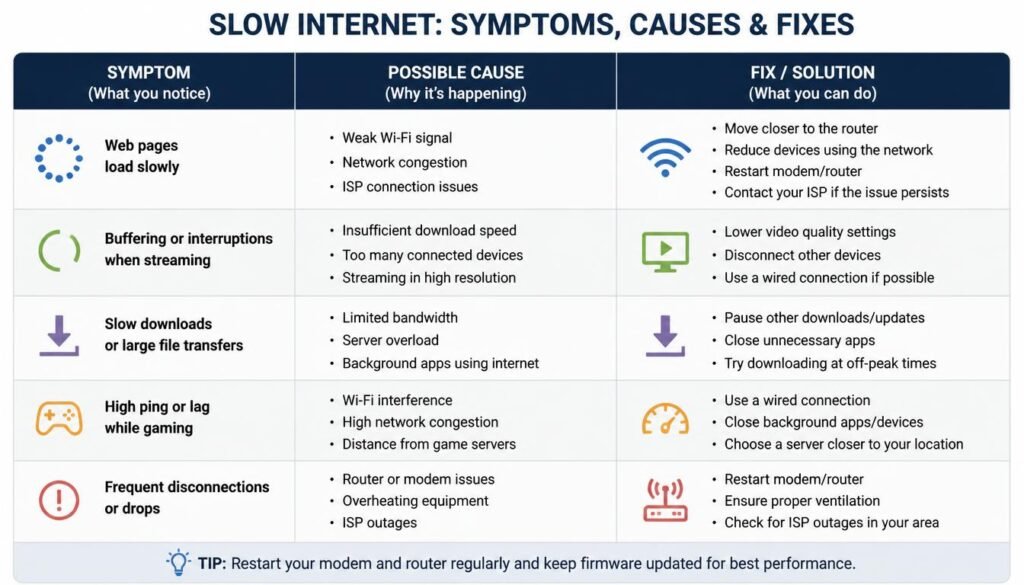
Diagnostic Comparison Matrix
Match your symptom to the row below before changing any settings. It will point you toward the right section instead of leaving you to guess.
| Symptom Scenario | Primary Root Cause | Immediate Remediation Step |
|---|---|---|
| Internet is slow on every device at the same time | Provider outage or upstream network congestion | Check the provider outage map and run a speed test against your plan |
| Only WiFi devices are slow, wired devices are fine | Weak WiFi signal or band congestion | Move the router to an open, central spot or switch to the 5 GHz band |
| One device is slow while every other device on the network is fast | A software, driver, or background task issue specific to that device | Isolate the device and follow a diagnostic path for that device alone |
| Speed drops only in the evening or at specific times | ISP congestion during peak hours or traffic shaping | Run a speed test at different times of day and compare it against your plan |
| Speed drops after connecting several new devices | Router bandwidth strain or NAT table congestion | Disconnect unused devices or enable Quality of Service on the router |
Start With the Checks That Take Thirty Seconds
Before touching a single setting, rule out the causes that have nothing to do with your equipment.
- Check your provider’s outage map or app.
Most major providers publish a live outage status page. A regional outage explains a sudden, unexplained slowdown far more often than a broken router does. - Run a speed test and compare it to your plan.
A 100 Mbps plan that tests at 95 Mbps is healthy. A 500 Mbps plan that tests at 40 Mbps points to a real problem, not a normal fluctuation. - Restart the modem and router.
Unplug both, wait sixty seconds, plug the modem in first, wait for its lights to stabilize, then plug in the router. This clears temporary memory and forces a fresh connection to your provider. - Ask whether anyone else in the house is on a video call, streaming in 4K, or downloading a large update.
Shared home bandwidth is finite, and one heavy task can make everything else feel slow.
If these four checks do not resolve things, the cause sits deeper in your network or on a specific device, and the sections below will help you isolate it.
Why Is My Internet So Slow on My Phone?
Phone slowdowns usually come from one of four sources rather than the internet plan itself.
- Background app activity.
Social media apps, cloud backup services, and messaging apps frequently sync in the background, consuming bandwidth even when the screen is off. - Weak signal at your current location.
Standing near a microwave, a thick wall, or the far edge of your home pushes your phone onto a slower connection without any visible warning. - A data cap or throttling threshold.
Many mobile and home internet plans quietly slow down after a monthly data threshold is reached, and the phone gives no clear indication that this has happened. - An outdated app or a corrupted cache.
A single misbehaving app can consume disproportionate bandwidth or hang on a stalled connection, dragging down the perceived speed of everything else.
Close background apps, move closer to your router, and check your data usage in your phone’s settings before assuming the network itself is at fault.
Why Is My Internet So Slow on My Android Phone?
Android adds a few wrinkles specific to the platform on top of the general phone causes above.
Adaptive connectivity features, often labeled Smart Network Switch or similar depending on the manufacturer, automatically hop between WiFi and mobile data whenever the WiFi signal weakens even slightly. This behavior can feel exactly like a random slowdown even though the phone is technically still connected. Battery optimization settings can also restrict background network access for apps Android considers unused, which sometimes causes a delayed or throttled connection the first time you reopen an app.
If your Android phone specifically drops or slows its WiFi connection rather than just feeling generally sluggish, our guide on fixing WiFi that keeps disconnecting on Android and other devices walks through the exact settings to check.
How to Fix Slow Internet Connection on PC
A desktop or laptop that feels slow usually has one of three culprits: too much running in the background, a wired versus wireless mismatch, or a system update quietly consuming bandwidth.
- Close unused browser tabs and background applications.
Each open tab and background app maintains its own connections and can quietly consume meaningful bandwidth, especially tabs that refresh automatically or play embedded video. - Check for a system or app update that is currently downloading.
Operating system and game platform updates frequently download in the background at full speed, leaving little bandwidth for anything else until they finish. - Test with a wired connection if you are currently on WiFi.
If a wired connection is dramatically faster, the bottleneck is your WiFi signal or band rather than your internet plan. In rarer cases, the opposite is true, and the ethernet connection is the one running slower. - Reboot the computer.
A simple restart clears temporary memory leaks and resets any network drivers stuck in an unusual state.
If your PC feels sluggish overall rather than only on the network side, our guide on Windows 11 slow performance troubleshooting covers the causes at the operating system level that often masquerade as an internet problem.
How to Fix Slow Internet on Laptop
Laptops introduce one extra variable that desktops do not have: power management. Many laptops throttle the WiFi adapter automatically when running on battery power to extend battery life, which can noticeably reduce throughput compared to the same laptop plugged in. If your laptop feels fast while charging and slow on battery, check the power plan settings and switch to a balanced or high performance profile while troubleshooting.
Laptops also tend to accumulate more background startup programs over time than desktops that get reformatted or replaced more frequently. Trimming startup programs and background services is one of the fastest ways to recover speed on an older laptop without spending anything on new hardware.
Why Is My Internet So Slow on My Computer But Not Other Devices?
This is one of the clearest signals in network troubleshooting: when only one device is affected while every other device on the same network performs normally, the internet connection itself is fine. The problem lives on that specific machine.
Common causes tied to a single device include an outdated or corrupted network driver, a network adapter stuck in a slower speed mode after a Windows update, background peer to peer file sharing settings that upload data to other users, or a security application scanning traffic in real time. Because this scenario points to a hardware or software configuration issue rather than a fault across the whole network, it needs a more technical diagnostic path than a simple restart.
We cover this exact scenario command by command, including the network adapter settings, the DNS and IP reset sequence, and the update settings most people overlook, in our full guide on why download speed is slow on one device while the rest of the network works fine. If you have ruled out background apps and a needed restart, that guide is the next step.
Why Is My Internet Slow Even Though I Have a Good Connection?
A fast, stable connection at the modem does not always translate into a fast experience on your device, and this gap confuses more people than any other slow internet symptom.
Several factors sit between your internet plan and the page actually loading on your screen. Router congestion from too many connected devices competing for the same radio spectrum is one of the most common. A Domain Name System server that responds slowly is another cause, since every website visit begins with a lookup step, and a sluggish DNS response adds delay before any data even starts transferring. Running a Virtual Private Network also adds encryption and routing overhead that can meaningfully reduce your usable speed, even when the underlying connection is fast.
If your DNS server itself appears to be the bottleneck, our step-by-step guide on fixing DNS server not responding on Windows 11 covers switching to a faster public DNS provider safely.
Why Is My Phone Internet So Slow but WiFi Is Fast?
When your home WiFi tests fast but your phone’s cellular data feels sluggish the moment you step away from WiFi, the cause sits entirely with your mobile carrier rather than your home network.
Carriers apply network prioritization during periods of high tower congestion, and some plans deprioritize data specifically after you have used a certain amount within your billing cycle, even without a hard data cap. Being connected to an older network mode, such as being locked to 4G in an area with strong 5G coverage, can also produce a large and noticeable speed gap. Checking your carrier’s network mode setting and confirming your data usage against your plan’s deprioritization threshold are the two fastest ways to identify this cause.
Why Is My Laptop Internet So Slow on Windows 11?
Windows 11 introduces a handful of operating system level settings that can throttle network throughput independently of your actual internet plan or WiFi signal strength. Background delivery optimization, which shares downloaded update files with other computers over the internet by default, is one of the most common and least visible causes.
Because this issue is specific to the operating system rather than the network itself, the fix involves a short sequence of Windows settings changes rather than anything on the router side. We walk through the exact settings, including the delivery optimization toggle and the network adapter properties involved, in our dedicated guide on why download speed slows down specifically on Windows 11 PCs.
Fixing Slow Internet on WiFi Signal and Placement
A large share of slow internet complaints come down to nothing more than router placement. Routers broadcast in a sphere, not a straight line, and thick walls, metal appliances, and distance all degrade the signal before it ever reaches your device.
Move the router to a central, elevated, open location away from metal cabinets and large appliances. If you have a router that supports both bands, switch devices that need heavy bandwidth to the 5 GHz band when they are close to the router, since it offers higher throughput at shorter range, and reserve the 2.4 GHz band for devices farther away that need the extra reach. Our complete guide on fixing a weak WiFi signal covers channel selection, firmware updates, and when a mesh system is worth the investment.
Ethernet Feels Slower Than WiFi: What That Means
Occasionally the opposite problem shows up: a wired ethernet connection performs worse than WiFi on the same computer. This almost always points to a specific hardware issue rather than a general internet problem, such as a network port capped at an older speed standard or a cable that is not rated for the speed you are paying for. Our detailed breakdown of why Ethernet sometimes runs slower than WiFi walks through the cable ratings and adapter settings responsible.
Slow Internet on a Game Console
Consoles handle network traffic differently than phones and computers, prioritizing active gameplay over background downloads by design. A console can show a fast wired connection and still feel slow specifically during game downloads or matchmaking. If an Xbox is the device in question, our guide on fixing slow WiFi and download speed on Xbox Series X covers the settings specific to that console that general router troubleshooting will not touch.
When the Plan Itself Is the Problem
If you have worked through every check above and the connection is still consistently slow, especially during peak evening hours, the plan you are paying for may simply be undersized for your household. A plan built for a single person streaming occasionally will struggle once multiple people are working from home, gaming, and streaming in 4K at the same time.
Before assuming you are stuck, compare current local providers, since fiber availability and pricing shift constantly and a faster, cheaper plan may already exist in your area. Our guide on switching internet providers without any downtime walks through comparing plans, avoiding early termination fees, and keeping your home online during the transition.
Frequently Asked Questions
How to fix slow internet on PC?
Close unused browser tabs and background applications, confirm no system update is downloading in the background, and test a wired connection if you are currently on WiFi. If the slowdown persists on that machine alone while other devices are fine, the issue belongs to that device rather than the whole network.
How to fix slow internet on phone?
Close background apps, move closer to the router, and check whether you have crossed a data threshold that triggers throttling. Restarting the phone clears temporary memory issues that can also silently slow the connection.
How to fix slow internet at night?
Evening slowdowns are usually caused by congestion during peak hours, either on your provider’s network or from every device in your household being active at once. Run a speed test at night and compare it against a midday test; a large gap points to your provider rather than your equipment.
How to fix slow internet on laptop?
Check whether the laptop is running on battery, since many laptops throttle the WiFi adapter to save power. Switch to a balanced or high performance power plan, close unnecessary startup programs, and test the connection again while the laptop is plugged in.
Why is my internet so slow on my computer but not other devices?
This points to a cause specific to that device rather than a network problem, most often an outdated network driver, a background update, or a security application scanning traffic. Since other devices work normally, your internet plan and router are not the source of the issue.
Why is my internet slow even though I have a good connection?
A fast connection at the modem does not guarantee a fast experience at your device. Router congestion from many connected devices, a DNS server that responds slowly, or an active VPN can all add delay even when the underlying connection tests well.
Why is my phone internet so slow but WiFi is fast?
This points to your mobile carrier rather than your home network. Carrier congestion, data deprioritization after a usage threshold, or being locked to an older network mode can all reduce cellular speed independently of your WiFi performance.
Why is my laptop internet so slow on Windows 11?
Windows 11 background delivery optimization, which shares update files with other computers over the internet, is a common and often overlooked cause. Disabling it in the Windows Update advanced settings frequently restores normal speed.
Can a failing router limit total internet speed?
Yes. A router nearing the end of its hardware lifespan, running outdated firmware, or overwhelmed by too many connected devices can cap your speed well below what your plan provides. Restarting the router regularly and keeping its firmware current both help extend its useful life.
Does changing DNS servers increase connection speed?
Changing your DNS server reduces the delay before a page begins loading by speeding up the domain lookup step, but it does not increase your underlying connection speed once data transfer begins. It is worth trying if pages feel slow to start loading even though downloads and speed tests look normal.
Final Thought: Fixing Slow Internet Without Guesswork
Slow internet almost always has a specific, identifiable cause rather than a vague network problem that requires a full plan upgrade. Working through the layers in order, starting with a provider outage check, moving through router placement and WiFi band selection, and isolating whether the issue affects one device or every device, will point you to the exact fix far faster than randomly changing settings. Once you understand how to fix slow internet using this layered approach, the same method applies the next time a new device or a new provider changes the picture.