
How to Measure Laptop Screen Size: Find just in 60 Seconds
Bought a laptop sleeve that did not fit? Ordered a screen protector that was too big? You are not alone and the problem is almost always the same: people measure their laptop the wrong way.Laptop screen size is not the same as laptop size. And measuring with a ruler is not even always necessary.
In this guide, you will learn three different methods to find your exact laptop screen size with a ruler, without a ruler, and using just your phone. You will also get a full size chart, a bag buying guide, and a centimeter conversion table so you never have to guess again. How to Measure Laptop Screen Size
Quick Answer: How Do You Measure Laptop Screen Size?
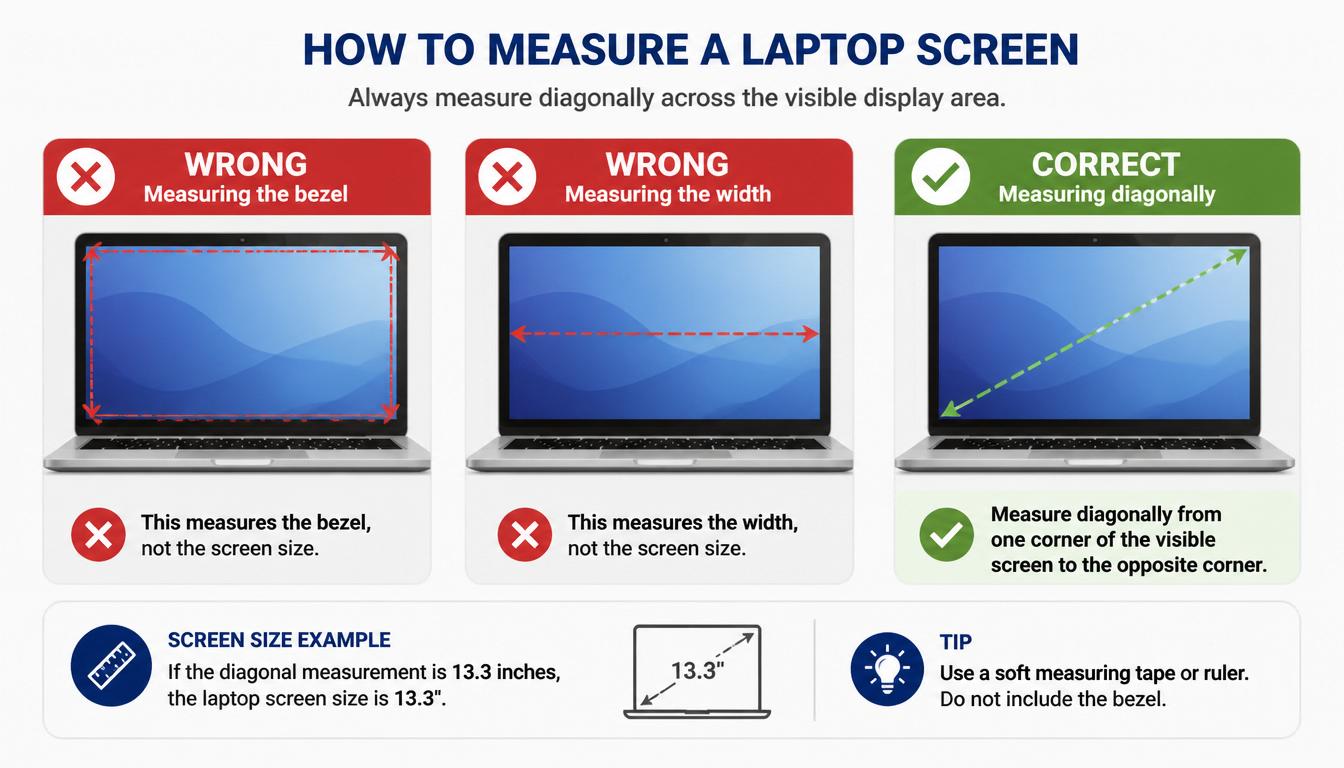
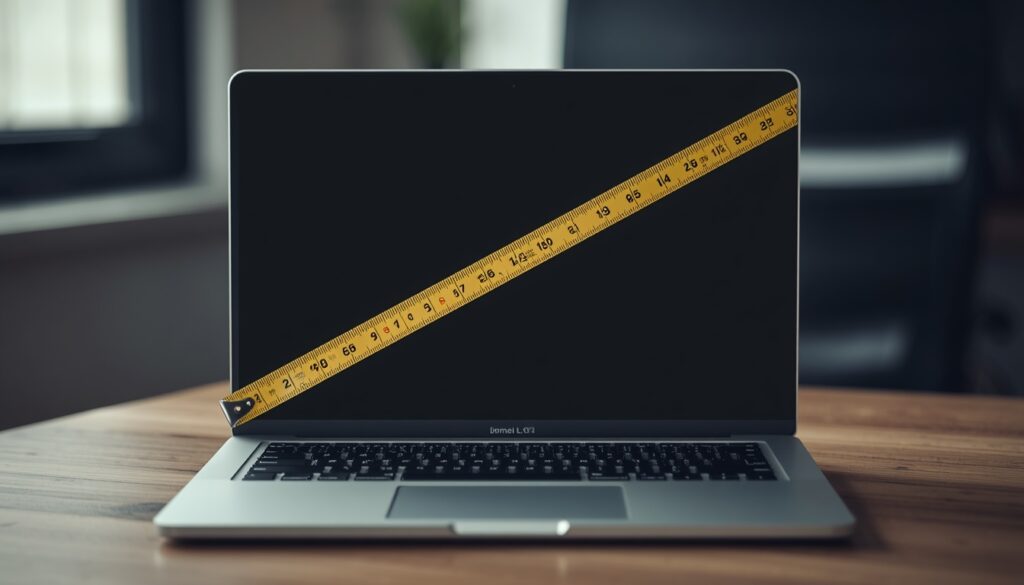
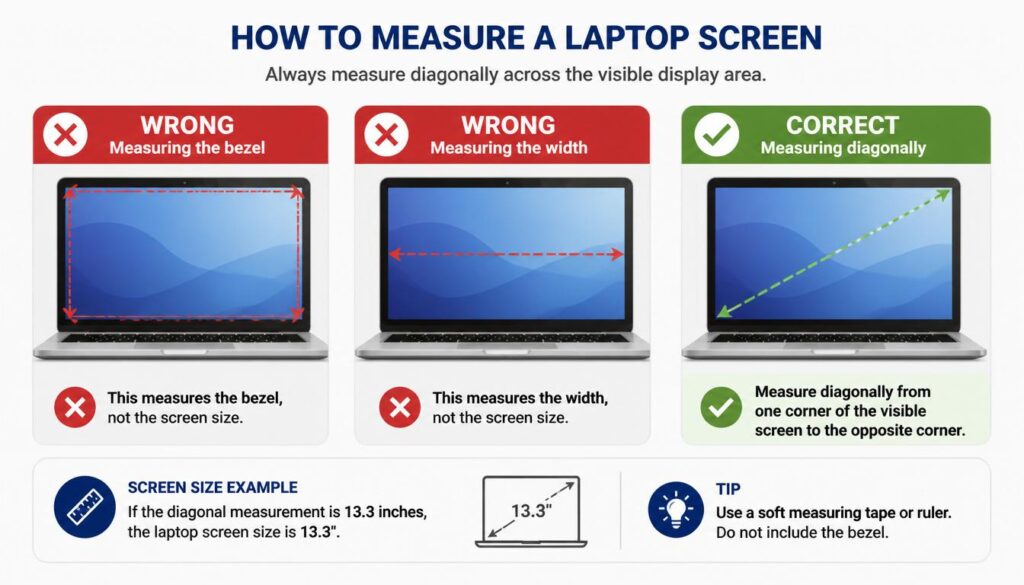
To measure a laptop screen size, measure the display diagonally from one visible corner of the screen to the opposite visible corner. Do not include the bezel or frame around the screen. The diagonal measurement in inches is your laptop’s official screen size.
For example:
- 13.3 inches = 13-inch laptop
- 14.0 inches = 14-inch laptop
- 15.6 inches = 15-inch laptop
- 17.3 inches = 17-inch laptop
This is the same method used by laptop manufacturers worldwide.
Why Is Laptop Screen Size Measured Diagonally?
Many people wonder why laptop screens are measured diagonally instead of by width or height.
The reason is simple. Measuring diagonally provides a standard method that all manufacturers can follow. Whether you buy a laptop from Apple, Dell, HP, Lenovo, ASUS, or Acer, screen size is always based on the diagonal measurement.
This makes it easier for buyers to compare different laptops.
What You Need to Measure a Laptop Screen
You don’t need expensive tools.
You can use:
- A measuring tape
- A ruler
- A digital measuring app (optional)
A flexible measuring tape usually gives the most accurate results.
Step-by-Step: How to Measure Laptop Screen Size
Step 1: Open Your Laptop
How to Measure Laptop Screen Size
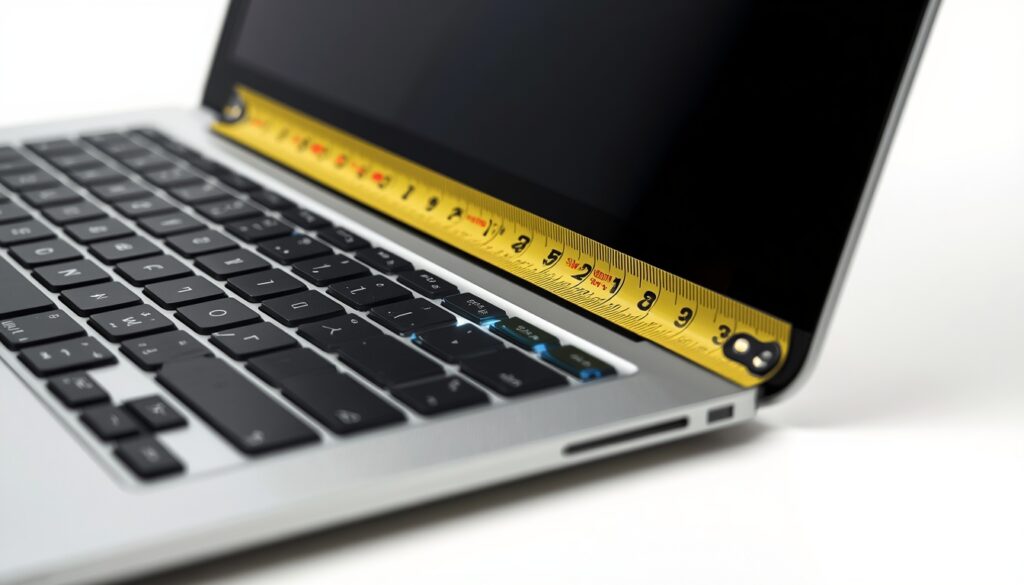
Place your laptop on a flat surface and open the screen completely.
How to Measure Laptop Screen Size
Important: Do You Have a Touchscreen Laptop?
If your laptop has a touchscreen display, be extra careful when measuring. Accidentally touching the screen while
placing a ruler against it can trigger apps, clicks, or inputs especially on Windows 11 touchscreen models.
To avoid this: turn off your laptop completely before measuring, or enable tablet mode to lock the screen
before you place anything against it. This is a small but important step that most measuring guides skip entirely.
Step 2: Find the Visible Display Area
Look at the part of the screen that lights up when the laptop is turned on.
Do not include:
- Plastic borders
- Black bezels
- Outer frame
Only measure the actual display area.
Step 3: Measure Diagonally
Place the measuring tape at one corner of the visible screen.
Stretch it diagonally to the opposite corner.
Example:
Top-left corner → Bottom-right corner
or
Top-right corner → Bottom-left corner
Step 4: Read the Measurement
The number shown in inches is your laptop screen size.
If the measurement is close to:
- 11.6 inches → 11-inch laptop
- 13.3 inches → 13-inch laptop
- 14 inches → 14-inch laptop
- 15.6 inches → 15-inch laptop
- 16 inches → 16-inch laptop
- 17.3 inches → 17-inch laptop
you now know your screen size.
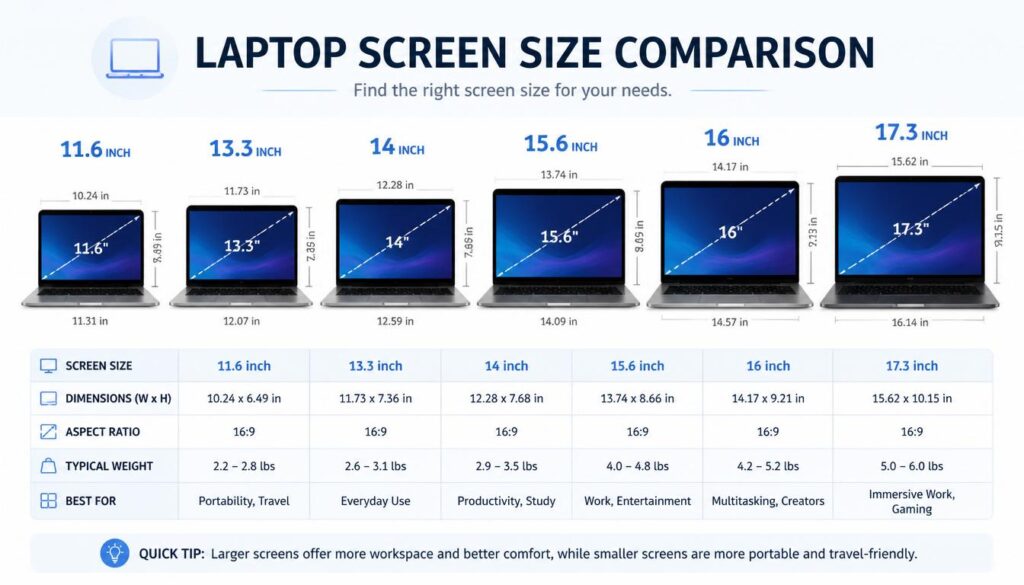
Common Laptop Screen Sizes
Here are the most common laptop display sizes available today.
| Screen Size | Common Use |
|---|---|
| 11.6 inches | Small Chromebooks |
| 13.3 inches | Ultrabooks and MacBooks |
| 14 inches | Business laptops |
| 15.6 inches | Everyday laptops |
| 16 inches | Professional and creator laptops |
| 17.3 inches | Gaming laptops |
Which Laptop Screen Size Is Right for You?
Knowing your screen size is only half the story. Choosing the right size for your needs matters just
as much. Here is a practical breakdown:
| Screen Size | Best For | Portability | Battery Life |
|---|---|---|---|
| 11–12 inch | Students, light travel | ⭐⭐⭐⭐⭐ | ⭐⭐⭐⭐⭐ |
| 13–14 inch | Professionals, commuters | ⭐⭐⭐⭐ | ⭐⭐⭐⭐ |
| 15–16 inch | Everyday home/office use | ⭐⭐⭐ | ⭐⭐⭐ |
| 17 inch | Gaming, video editing | ⭐⭐ | ⭐⭐ |
Quick rule of thumb:
- Travel a lot → 13 or 14 inch
- Work from home → 15.6 inch
- Gaming or creative work → 17 inch
- Schoolwork only → 11 or 12 inch Chromebook
The 15.6-inch display is currently the most common laptop screen size.
How to Measure Laptop Screen Size
How to Measure Laptop Screen Size
Laptop Screen Size in Centimeters (CM Conversion Chart)
Many laptop bags and accessories sold in Europe, Pakistan, India, and other countries list sizes in
centimeters not inches. Here is the complete conversion chart:
| Inches | Centimeters | Common Laptop Type |
|---|---|---|
| 11.6 inch | 29.5 cm | Small Chromebook |
| 13.3 inch | 33.8 cm | MacBook Air, Ultrabooks |
| 14.0 inch | 35.6 cm | Business laptops |
| 15.6 inch | 39.6 cm | Standard laptops |
| 16.0 inch | 40.6 cm | Creator/Pro laptops |
| 17.3 inch | 43.9 cm | Gaming laptops |
To convert inches to centimeters yourself multiply the inch value by 2.54.
Example: 15.6 × 2.54 = 39.6 cm
Does Laptop Screen Size Include the Bezel?
No.
Laptop screen size only includes the visible display area.
The bezel is the border around the screen. It is not part of the screen measurement.
If you include the bezel, you’ll get the wrong size and may buy accessories that do not fit properly.
measure the entire laptop.
How to Measure Your Full Laptop Dimensions (Not Just the Screen)
There are two completely different measurements for laptops:
Screen size = diagonal of the display only (in inches)
Laptop dimensions = full physical size of the device (height, width, thickness)
Both measurements matter for different reasons.
When You Need Screen Size:
- Buying screen protectors
- Buying replacement displays
- Comparing laptop displays
When You Need Full Laptop Dimensions:
- Buying a laptop bag or backpack
- Buying a laptop stand or docking station
- Setting up a workspace
How to Measure Full Laptop Dimensions:
Step 1 — Close your laptop completely
Step 2 — Measure the Width
Measure from the leftmost edge to the rightmost edge of the closed lid. This is your laptop width.
Step 3 — Measure the Height (Depth)
Measure from the front edge to the back edge of the closed lid. This is your laptop depth.
Step 4 — Measure the Thickness
With the laptop still closed, measure from the very bottom of the base to the top of the lid. Include
rubber feet in this measurement for the mostaccurate bag fit.
⚠️ Important: A laptop with a 15.6-inch screen from Brand A may be physically wider or narrower than a
15.6-inch laptop from Brand B. Always measure the full dimensions before buying a bag never assume based on screen size alone.
How to Find Laptop Screen Size Without Measuring
How to measure laptop screen size without measuring.
If you don’t have a ruler or tape measure, there are other ways to find your laptop screen size.
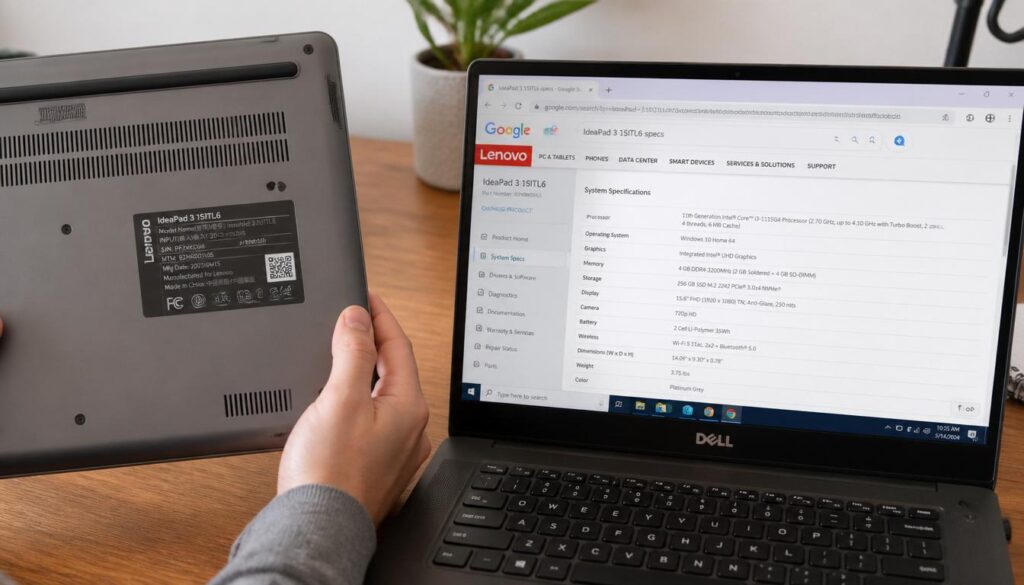
Check the Model Number
Most laptops have a sticker on the bottom.
Find the model number and search for it online.
The manufacturer’s specifications page usually lists the screen size.
Check Your Purchase Receipt
If you bought the laptop online, look at the order details.
The display size is usually listed in the product description.
Check the Manufacturer Website
Visit the official support page and enter your laptop model.
You’ll see detailed specifications, including screen size.
How to Measure Laptop Screen Size
Use Your Phone Camera (No Ruler Needed)
If you have no ruler, no tape measure, and cannot find the model number, your smartphone camera can help.
Here is how:
Download a free “ruler app” on your Android or iPhone search “ruler” in your app store. Apps like “Ruler App” or “AR Ruler” use your camera to measure real world objects.
1: Open the app and point your phone camera at your laptop screen diagonally from corner to corner.
2: The app uses augmented reality to give you an approximate diagonal measurement.
Note: Phone ruler apps give approximate results usually within 0.3 to 0.5 inches of the real size. For exact measurements, always use a physical ruler or the model number method. This method works best when you need a quick estimate before buying a laptop bag or cover.
How to Measure Laptop Screen Size
How to Check Laptop Screen Size on Windows
Windows doesn’t always show screen size directly, but it can help you identify your model.
- Press Windows + I.
- Open Settings.
- Click System.
- Select About.
- Note your device model.
Search the model online to find the exact display size.
While you are in Windows Settings checking your device model, it is also a good time to check
your display resolution. If your laptop screen looks blurry or text appears too small, read our guide on fixing Windows 11 display and performance issues.
How to Check Screen Size on a MacBook
- Click the Apple menu.
- Select About This Mac.
- Look for the model name.
For example:
- MacBook Air 13
- MacBook Pro 14
- MacBook Pro 16
The model name usually includes the display size.
Laptop Screen Size vs Screen Resolution
Many people confuse screen size with screen resolution.
They are different things.
Screen Size
Screen size is the physical size of the display measured in inches.
Example:
- 13.3 inches
- 15.6 inches
- 17.3 inches
Screen Resolution
Resolution is the number of pixels displayed on the screen.
Examples:
- 1366 × 768
- 1920 × 1080
- 2560 × 1440
- 3840 × 2160
Two laptops can have the same screen size but different resolutions.
What Is Laptop Screen Aspect Ratio?
Aspect ratio is the proportion of width to height of your laptop screen. Most people have never heard
of it but it directly affects how content looks on your display.
Common laptop aspect ratios in 2026:
| Aspect Ratio | Shape | Common Use |
|---|---|---|
| 16:9 | Wide (standard) | Movies, gaming, most laptops |
| 16:10 | Slightly taller | MacBooks, productivity laptops |
| 3:2 | Square-ish | Microsoft Surface, coding |
| 4:3 | Very square | Old laptops, rare today |
Most Windows laptops use 16:9. MacBooks switched to 16:10 in 2021 for more vertical space, which is
useful for reading documents and writing. If you are buying a screen protector, the aspect ratio matters as much as the diagonal size. A 15.6-inch 16:9 screen is shaped differently from a 15-inch 16:10 screen they are not interchangeable.
Common Mistakes When Measuring a Laptop Screen
Avoid these mistakes:
Measuring the Bezel
Only measure the display area.
Measuring Width Only
Laptop screens are measured diagonally, not horizontally.
Measuring the Entire Laptop
This gives the laptop size, not the screen size.
Guessing the Size
Many people assume they have a 15-inch laptop when it could actually be 14 inches or 15.6 inches.
How to Measure Laptop Screen Size
How to Measure Laptop Screen Size
Why Knowing Your Laptop Screen Size Matters
Knowing your exact screen size helps when buying:
- Laptop sleeves
- Laptop bags
- Screen protectors
- Privacy screens
- Replacement displays
- External monitor accessories
A small measurement mistake can lead to compatibility issues.
How to Choose a Laptop Bag Based on Your Screen Size
This is the section most people actually need and most laptop measurement guides skip entirely.
Here is the correct process:
Step 1: Measure Your Screen Size (diagonal)
Use the method described above.
Step 2: Measure Your Full Laptop Dimensions
Width and depth of the closed laptop NOT the screen size.
Step 3: Check the Bag’s Internal Dimensions
Look at the product listing for the internal measurements of the laptop compartment not the bag’s external size.
Step 4: Add 1–2 cm Buffer
Your laptop should slide in and out comfortably. A bag that is exactly the same size as your laptop will be a very tight fit and may damage the hinges.
Step 5: Check for Padding
For daily carry, look for at least 10mm of padding on all sides. For travel, 15–20mm is recommended. Common mistake: People buy a “15 inch laptop bag” based on screen size, but their 15.6-inch laptop has a physical width of 37–38cm, which may not fit in some 15-inch bags. Always check internal dimensions.
If your laptop is running hot while working, a good laptop stand with airflow can also help alongside your bag. Check our guide on how to check CPU temperature on Windows 11 to see if overheating is affecting your device.
Frequently Asked Questions
How to Measure Laptop Screen Size
Question: How do you measure laptop screen size correctly?
Answer:
To measure a laptop screen size correctly, measure the visible display diagonally from one corner to the opposite corner. Do not include the bezel or outer frame. The measurement in inches represents the laptop’s official screen size.
Question: Does laptop screen size include the bezel?
Answer:
No, laptop screen size does not include the bezel. Only the active display area is measured. Including the bezel can result in an inaccurate screen size measurement.
Question: Can I find my laptop screen size without measuring it?
Answer:
Yes. You can find your laptop screen size by checking the model number, viewing the manufacturer’s specifications page, checking your purchase receipt, or looking up the device details online.
Question: What is the most common laptop screen size?
Answer:
The most common laptop screen size is 15.6 inches. It offers a good balance between portability, productivity, and entertainment.
Question: How do manufacturers measure laptop screens?
Answer:
Laptop manufacturers measure screens diagonally from one visible corner of the display to the opposite corner. This industry-standard method is used worldwide.
How do I measure my laptop screen in centimeters?
Answer:
Measure the visible display diagonally from corner to corner using a ruler or tape, then multiply the inch result by 2.54 to get centimeters. For example, a 15.6-inch screen equals approximately 39.6 cm.
Can I measure my laptop screen without a ruler?
Answer:
Yes. Three methods work without a ruler: check your laptop model number on the manufacturer website, use a ruler app on your smartphone camera, or check your original purchase receipt or order confirmation email which usually lists the display size
Does laptop screen size include the plastic frame?
Answer:
No. Laptop screen size refers only to the visible display area the part that lights up. The plastic frame or bezel around the screen is never included in the official screen size measurement.
Final Thoughts
Learning how to measure laptop screen size is easier than most people think. Simply measure the visible display diagonally from corner to corner and ignore the bezel or outer frame. This gives you the exact screen size used by manufacturers.
Whether you’re buying a laptop bag, screen protector, replacement display, or comparing different laptop models, knowing the correct screen size helps you make better decisions and avoid costly mistakes.
If you are having trouble connecting your laptop to WiFi while setting it up after measuring for accessories, visit our complete fix guide WiFi connected but no internet — 7 fixes.
If you need any more help you can visit our website and find many solutions of your daily life problems.
And if you are facing network speed hen you can read this post article.


