
How Much Hotspot Do I Have? Check Your Data (Easy Guide)
Running out of hotspot data can be frustrating, especially when you are in the middle of work, watching a video, or attending an online meeting. Many people don’t realize how quickly hotspot data can disappear until they receive a warning from their mobile carrier.
If you’ve been wondering, How much hotspot do I have left?, don’t worry. Checking your hotspot usage is actually very simple. Whether you use an iPhone, Android phone, or a Windows laptop, there are built-in tools that can help you see how much data you’ve already used.
How Much Hotspot Do I Have
In this guide, I’ll walk you through the easiest ways to check your hotspot usage, track your remaining data, and avoid running out of data before the end of your billing cycle.
Quick Answer
The easiest way to check how much hotspot data you have left is by:
- Looking at your phone’s data usage settings
- Checking your mobile carrier’s app or website
- Viewing hotspot statistics on your device
- Setting data limits to avoid overuse
For the most accurate information, it’s usually best to check directly with your mobile carrier.
What Is Hotspot Data?
A mobile hotspot allows your phone to share its internet connection with other devices, such as a laptop, tablet, smart TV, or gaming console.
Whenever those devices browse the web, stream videos, download files, or join video calls, they use data from your mobile plan. If your carrier gives you a separate hotspot allowance, you’ll want to keep an eye on how much of it is left.
How to Check Hotspot Usage on iPhone
If you’re using an iPhone, Apple makes it fairly easy to see how much hotspot data has been used.
Follow These Steps
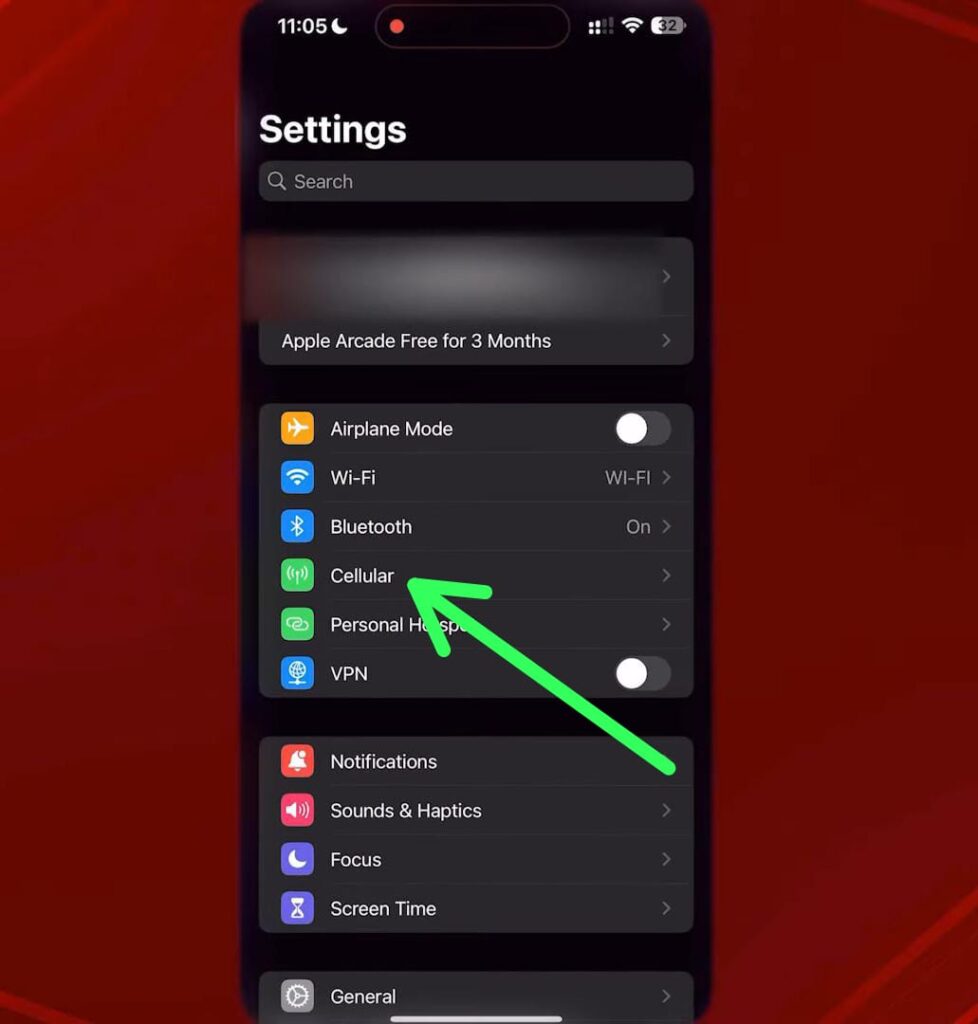
- Open Settings.
- Tap Cellular or Mobile Data.
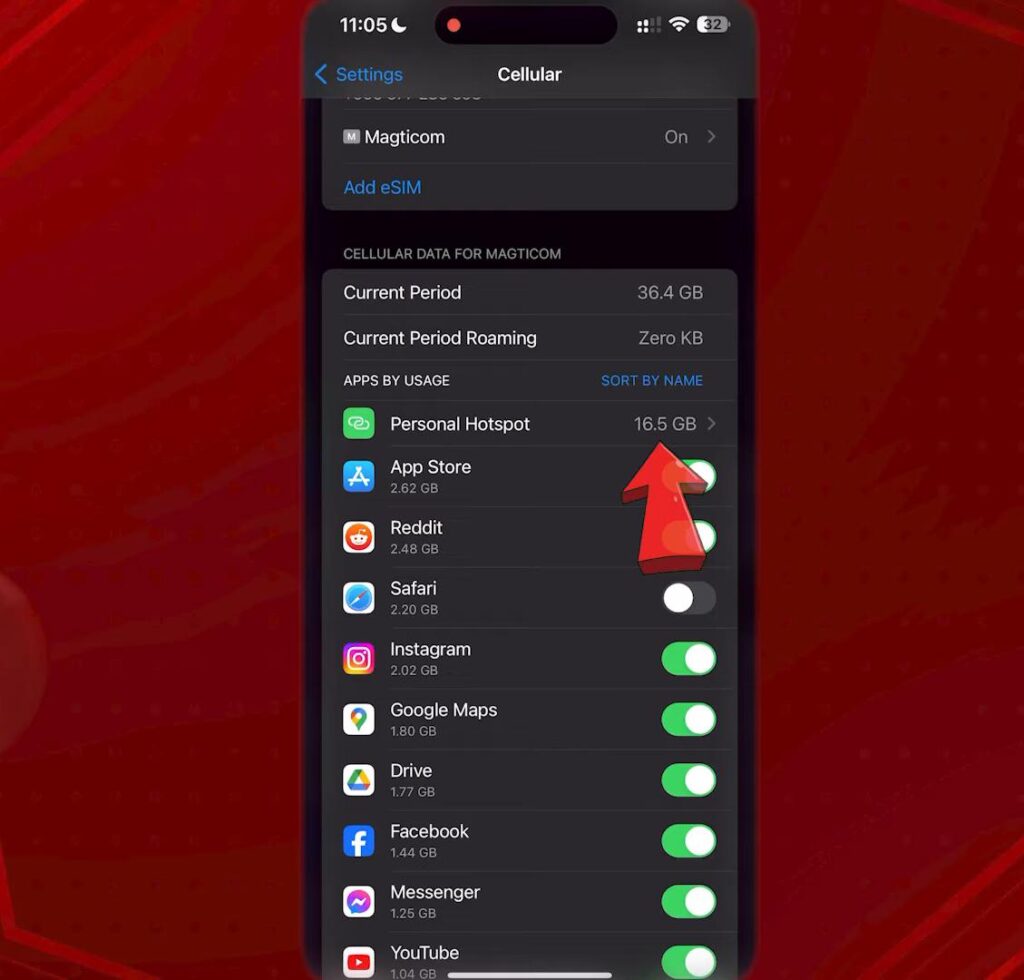
- Scroll down to the Cellular Data section.
- Find Personal Hotspot.
Hotspot Do I Have
Hotspot Do I Have
You’ll see how much data has been used through your hotspot connection.
Want to Start Fresh?
You can reset the counter at the beginning of every month.
- Scroll to the bottom of the page.
- Tap Reset Statistics.
This helps you track your monthly hotspot usage more accurately.
Hotspot Do I Have
If you connected WiFi to your iphone and wants to fix iphone problems you can read this article.
How to Check Hotspot Usage on Android
Most Android phones come with built-in tools that track hotspot and mobile data usage.
Steps to Follow
- Open Settings.
- Tap Network & Internet or Connections.
- Select Data Usage.
- Tap Mobile Data Usage.
- Look for Mobile Hotspot & Tethering.
Here you’ll see how much hotspot data has been consumed.
Helpful Tip
Many Android phones allow you to set a hotspot data limit. For example, if you only want to use 2GB or 5GB, the phone can automatically turn off the hotspot after reaching that limit.
How to Check Hotspot Data Usage on Windows 11
If you often connect your laptop to your phone’s hotspot, Windows can show how much data that connection has used.
Here’s How
- Press Windows + I to open Settings.
- Click Network & Internet.
- Select Data Usage.
- Review the usage details for your current network.
Hotspot Do I Have
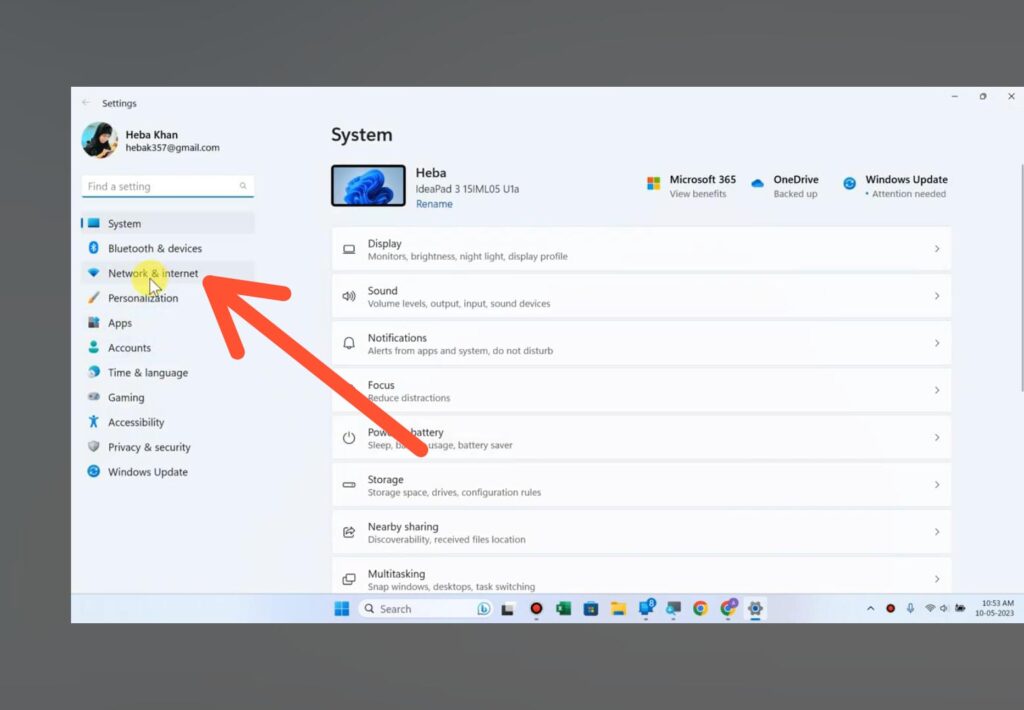
Windows keeps track of data usage over the previous 30 days, making it easier to understand where your data is going.
If you wants to boost your PC and Laptop speed you can read this article.
Check Your Remaining Hotspot Data Through Your Carrier
While device statistics are helpful, the most accurate way to see how much hotspot data you have left is through your mobile carrier.
Most carriers provide:
- Mobile apps
- Online account dashboards
- Usage alerts
- Data balance tools
Simply log in to your account and check:
- Total hotspot allowance
- Data already used
- Remaining hotspot data
- Current billing cycle
If the numbers on your phone and carrier account don’t match, trust the carrier’s numbers since they control your actual data allowance.
How Much Data Do Everyday Activities Use?
Many people are surprised by how much data certain activities consume.
Hotspot Do I Have
| Activity | Estimated Data Usage |
|---|---|
| About 10 MB per hour | |
| Web Browsing | Around 60 MB per hour |
| Social Media | Around 100 MB per hour |
| Music Streaming | Around 150 MB per hour |
| Zoom Meetings | 600 MB to 1 GB per hour |
| YouTube 480p | Around 700 MB per hour |
| YouTube 720p | Around 1.5 GB per hour |
| YouTube 1080p | 2 to 3 GB per hour |
| Netflix HD | Around 3 GB per hour |
| Online Gaming | 50 to 300 MB per hour |
Hotspot Do I Have
Video streaming is usually the biggest reason people run through their hotspot data so quickly.
How Long Will 15GB of Hotspot Last?
There’s no single answer because it depends on how you use it.
Generally, 15GB may be enough for:
- More than 200 hours of email use
- Over 100 hours of web browsing
- Around 20 hours of Zoom meetings
- 15 to 20 hours of standard-definition video streaming
- 5 to 7 hours of HD streaming
Light users can make 15GB last for weeks, while heavy streamers may use it up in just a few days.
Why Does My Hotspot Data Run Out So Fast?
If your hotspot data seems to disappear quickly, one of these common reasons may be responsible.
Automatic Updates
Phones and computers often download updates in the background without you noticing.
Cloud Backups
Services like Google Photos, OneDrive, and iCloud may upload large files automatically.
Video Streaming
Watching videos in HD or 4K can consume several gigabytes in a short amount of time.
Multiple Connected Devices
Every device connected to your hotspot shares the same data allowance.
Background Apps
Some apps continue syncing data even when you’re not actively using them.
Simple Ways to Save Hotspot Data
A few small changes can help your hotspot data last much longer.
Turn Off Automatic Updates
Pause updates until you’re connected to regular Wi-Fi.
Lower Video Quality
Streaming at 480p or 720p uses far less data than HD or 4K.
Pause Cloud Backups
Disable automatic uploads while using hotspot data.
Enable Data Saver Mode
Most phones and browsers include built-in data-saving features.
Disconnect Devices You Don’t Need
Keeping fewer devices connected reduces unnecessary data usage.
Frequently Asked Questions
How do I know how much hotspot data I have left?
You can check your phone settings or log in to your carrier account. Carrier apps usually provide the most accurate information.
Does hotspot use more data than regular mobile browsing?
No. A hotspot uses data based on what connected devices are doing. The hotspot itself doesn’t consume extra data.
Can I get unlimited hotspot data?
Some carriers offer unlimited plans, but many reduce hotspot speeds after a certain usage threshold.
How much hotspot data does Netflix use?
Netflix can use around 1 GB per hour in standard quality and up to 3 GB per hour in HD.
Why is my hotspot slower after using a lot of data?
Many mobile providers slow your connection after you reach your monthly hotsp
How to Keep Track of How Much Hotspot Do I Have?
Many people only start wondering how much hotspot data they have left when their internet suddenly slows down or stops working. I have found that checking your hotspot usage regularly is one of the easiest ways to avoid surprises. Most phones already include tools that show how much data you’ve used, and many mobile carriers also provide this information through their apps. Taking a quick look at your hotspot usage every now and then can help you stay within your data limit and avoid running out of internet when you need it most.
Final Thoughts
If you’ve been asking yourself, “How much hotspot do I have?”, checking your usage is easier than most people think. Whether you’re using an iPhone, Android phone, or Windows laptop, built-in tools can help you monitor your data and avoid unpleasant surprises.
By keeping an eye on your hotspot usage and following a few simple data-saving tips, you can make your monthly data allowance last much longer.
If you need any more help about windows and wifi problems then you can visit our website.


