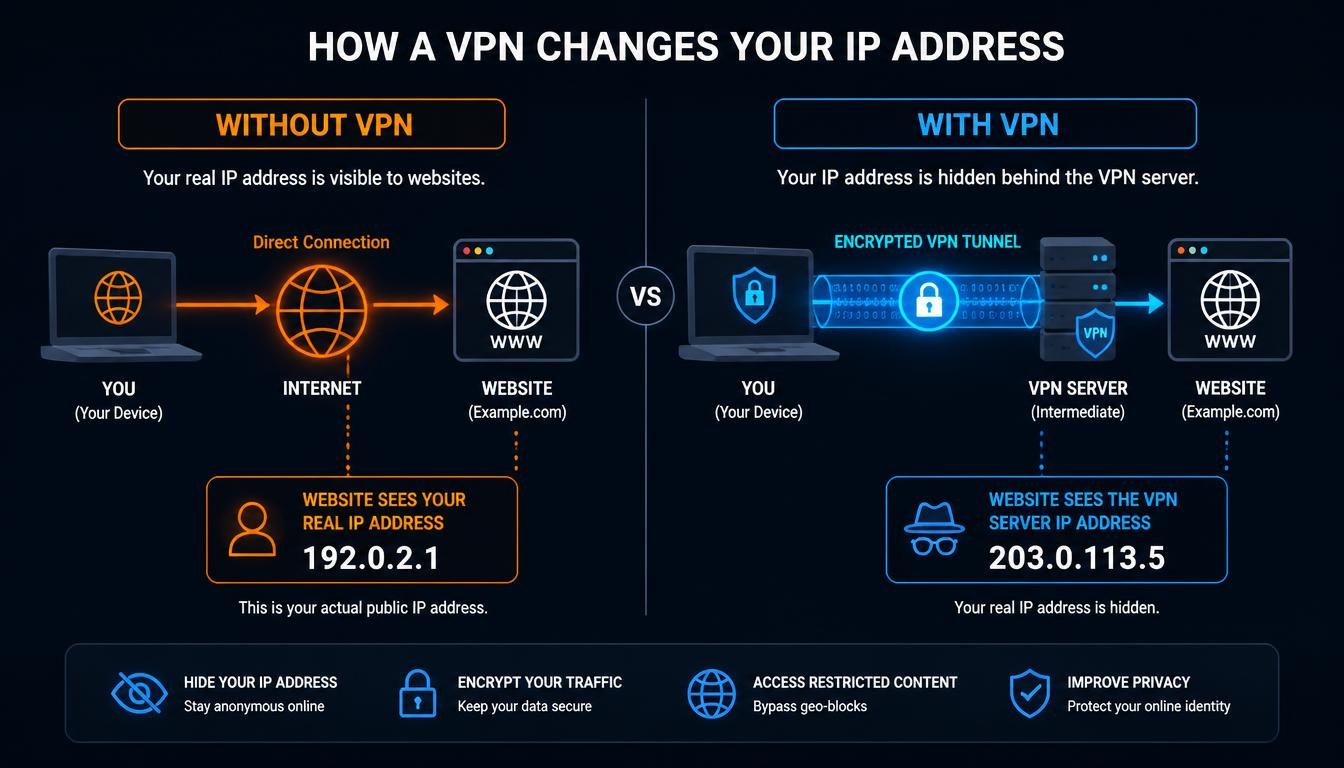
Your internet service provider hands you a public IP address the moment your router connects, and a VPN can swap that number out in seconds, but almost every guide on this topic stops there and leaves the parts that actually matter unexplained.
Quick Answer: Does VPN Change IP Address?
Yes, the short answer to does a VPN change IP address is straightforward. A VPN changes your public IP address by routing your traffic through an encrypted tunnel to a remote server, so websites see the server IP instead of your own. It does not change your device’s private LAN IP, your GPS location, or the identity tied to accounts you remain logged into.
Standard Connection vs. VPN Protected Connection
| Attribute | Standard Internet Connection | VPN Protected Connection |
|---|---|---|
| Public IP Visibility | Your ISP assigned address is visible to every site you visit | Websites see the VPN server address instead of yours |
| ISP Data Logging | ISP can log domains and connection metadata by default | ISP sees only encrypted traffic to the VPN server |
| Encryption Status | Traffic is unencrypted unless the site itself uses HTTPS | Full tunnel encryption from device to VPN server |
| Geographic Location Signal | Location signal matches your actual ISP region | Location signal matches the VPN server region |
Does a VPN Change IP Address? The Technical Breakdown
A VPN, or virtual private network, works by building an encrypted tunnel between your device and a remote server operated by the VPN provider, and this is the mechanism it uses to mask IP address details from every site you visit. Once that tunnel is active, every request your device sends gets wrapped in encryption and forwarded through the VPN server first. The website on the other end never talks to your device directly. It only ever sees the VPN server’s IP address.
This is the core mechanism behind the answer to does a VPN change IP address: it does not disguise your original address on the same connection, it replaces it entirely for the outside world by routing all outbound traffic through a different exit point. Your ISP still sees that you are connected to a VPN server, but it cannot see which sites you are visiting inside that tunnel because the payload itself is encrypted.
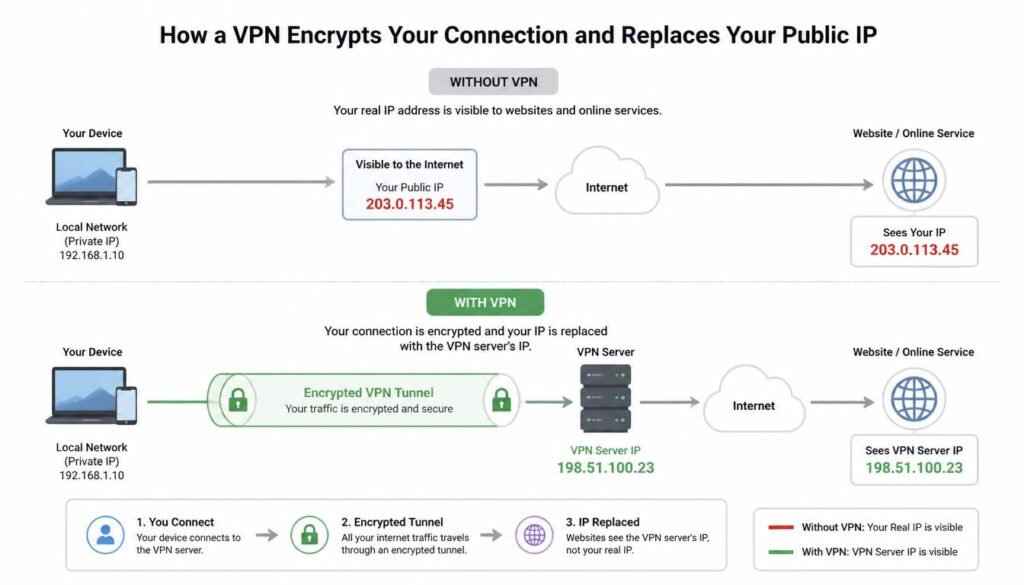
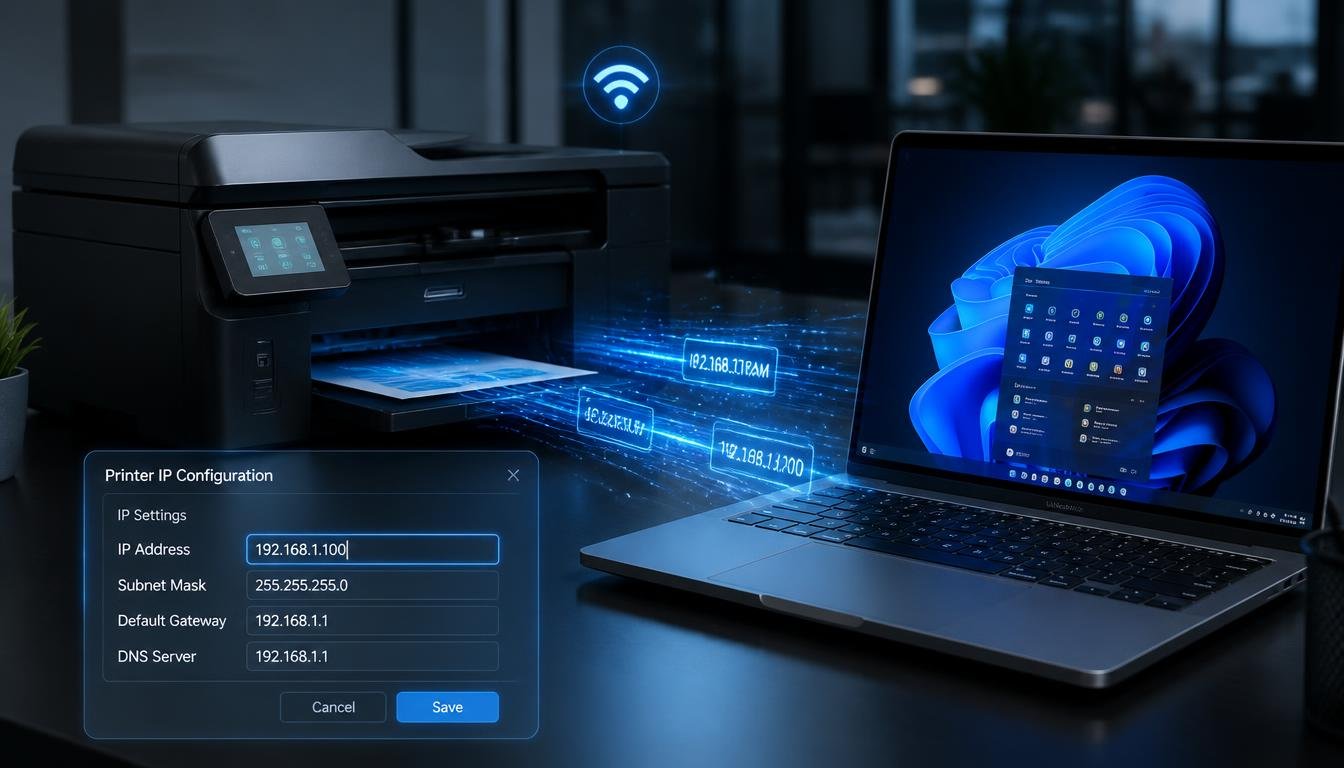
Most consumer VPN apps handle this swap automatically the moment you tap connect, so there is rarely any manual configuration involved. If you want to see the underlying settings a VPN adjusts on your device, the same network fields covered in our guide on how to modify IP address settings are the ones a VPN app modifies behind the scenes, just without requiring you to touch them yourself.
Does a VPN Change Your Private IP Address, or Only the Public One?
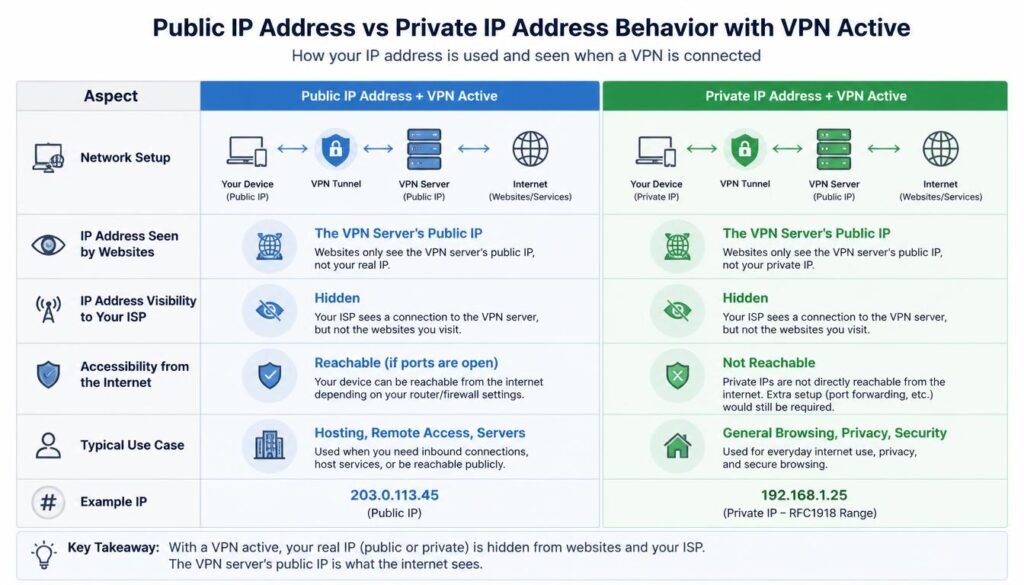
This is the single most confused point across competing VPN guides, and it deserves a direct answer. A VPN changes your public IP address only. Your private LAN IP address, the number your router assigns to your device internally, typically something in the 192.168.x.x or 10.x.x.x range, stays exactly the same whether the VPN is on or off.
Your router uses this private address to know which device on your home network should receive incoming data. A VPN operates one layer above that, at the point where your traffic leaves the router and heads out to the wider internet. Turning a VPN on or off has no effect on the private address your device holds locally, and you can confirm this yourself by checking your network settings before and after connecting. For a full walkthrough of where each address type lives on your device, see our guide on subnet structure and IP segmentation, which breaks down exactly how private and public addressing relate to each other.
Does VPN Change IP Address?
Does a VPN Change Your IP Address on iPhone and Android Devices?
The behavior is consistent across platforms, but the confirmation steps differ slightly. On both iPhone and Android, connecting to a VPN app replaces the public IP address that websites and apps see, using the same encrypted tunnel method described above. The phone’s local WiFi or cellular network assignment is untouched.
On iPhone, the VPN status appears as a small icon in the status bar once connected, and you can verify the new address by opening a browser and searching what is my IP. On Android, most VPN apps show a connected badge in the notification shade, and the same browser check confirms the swap. If your IP settings look inconsistent between visits to the same page, our guide on how to find your current IP settings walks through checking both the assigned public and private values directly from the device.
One mobile specific detail worth flagging: many phones now include a private WiFi address feature that randomizes the local address per network for privacy. This runs independently of any VPN and is not the mechanism responsible for changing your public facing address.
Why Your Real Location Might Still Be Revealed
A changed public IP address does not automatically mean your real identity or location stays hidden everywhere. Three specific leaks account for most of the confusion here, and competing guides tend to gloss over all three.
Logged in accounts. If you stay signed into Google, Facebook, or Instagram while connected to a VPN, those platforms already know exactly who you are from your account activity, not from your IP address. Masking your IP address changes what the network layer sees, but it does nothing to change what a service you are actively logged into already knows about you.
GPS on mobile devices. A VPN reroutes network traffic, but it has no control over your phone’s GPS chip. Apps like Google Maps that request location permission directly can still read your actual physical position through GPS, completely independent of whatever IP address your VPN assigns. If an app shows your real location despite an active VPN, GPS permissions are almost always the reason, not a failure of the VPN itself.
DNS leaks and WebRTC leaks. A DNS leak happens when your device sends domain lookup requests outside the encrypted tunnel, often straight to your ISP’s own DNS servers, which exposes your browsing activity even while your traffic appears to route through the VPN. A WebRTC leak is a separate flaw specific to browsers, where a background feature used for video calls can expose your real IP address to a website even with a VPN active, because WebRTC can bypass the VPN’s routing rules entirely. Reputable VPN providers include DNS leak protection and WebRTC leak blocking as standard features, and a proper kill switch cuts your internet entirely if the VPN tunnel drops, preventing your unprotected real IP from leaking during that gap. If your connection behaves oddly after enabling these protections, our DNS troubleshooting guide covers the underlying causes in more depth.
How Often Does a VPN Change Your IP Address?
This depends entirely on the type of IP address your VPN provider assigns, and the terminology varies by provider.
- Dynamic shared IP: The most common setup among consumer VPNs. You are assigned an address from a shared pool, and it typically changes each time you reconnect to the server, or on a rotation schedule the provider controls.
- Static dedicated IP: Some providers offer a fixed address reserved for your account alone, useful for services that flag frequent IP changes as suspicious. This address stays the same across sessions unless you manually switch servers.
- Rotational IP: A smaller set of providers rotate your assigned address automatically at set intervals, even mid session, to make tracking harder over time.
Simply disconnecting and reconnecting to the same VPN server can sometimes return a different address from the shared pool, though this is not guaranteed on every provider. Switching to a server in a different city or country will reliably produce a new address every time, which is the basic mechanism behind geolocation spoofing for streaming and pricing checks. This same dynamic vs static distinction applies to your home network too, where your ISP DHCP lease determines how often your own baseline public address changes independent of any VPN, and our guide on what a static IP actually does explains the tradeoffs if you are considering a fixed address for reasons unrelated to VPN use.
It is worth separating two related but different goals people search for under this topic: masking your IP address for privacy versus changing your apparent location for content access. A VPN accomplishes both at once because the mechanism, an encrypted tunnel to a server in another region, produces the same result either way. A basic proxy or a browser only IP address changer extension can approximate the location change without the encryption, which is why security minded users still favor a full VPN over a lighter weight extension for anything beyond casual browsing.
Can Government or Police Track You Even If You Use a VPN?
A VPN raises the difficulty considerably, but it does not make tracking categorically impossible. Law enforcement with a valid legal order can compel a VPN provider to hand over connection logs, if that provider keeps them. This is exactly why providers with a strict, independently audited no logs policy matter more than marketing claims alone.
Even with a genuinely no logs provider, other angles remain open. Account level tracking through platforms you are logged into, malware already present on a device, or old fashioned traditional investigative work can all identify a person independent of the IP address a VPN happens to mask. A VPN is a strong privacy layer against casual observers, ISPs, and advertisers, not an absolute guarantee against a determined, well resourced investigation. If your broader concern is what your home network already exposes to anyone with router access, our piece on what a WiFi bill and router logs can actually reveal covers that adjacent risk in detail.
Frequently Asked Questions
What is the best VPN to change IP address?
The strongest options combine a large server network, a verified no logs policy, built in DNS and WebRTC leak protection, and an automatic kill switch. Reputable, independently audited providers consistently outperform free VPN apps on all four of these points.
What is the best VPN to change location for free?
Free VPN tiers can change your visible location, but they typically come with a limited number of server locations, slower speeds, and weaker leak protection than paid plans. Treat a free tier as a trial rather than a long term privacy solution.
What is an IP address changer, and what is an IP address changer extension?
An IP address changer is any tool, VPN, proxy, or browser extension, that alters the public IP address a website sees. A browser extension version only affects traffic inside that specific browser and leaves the rest of your device’s connections on your original address.
How do I change my IP address on iPhone?
The most reliable method is connecting through a VPN app, which changes your public facing address system wide. For local network changes instead, open Settings, tap WiFi, tap the information icon next to your network, and edit the Configure IP section manually.
What is my IP address, and how do I verify it actually changed?
Search “what is my IP” in any browser before and after connecting to your VPN and compare the two results. If the second address matches your VPN server’s region instead of your actual location, the change was successful.
Does VPN change IP address on Android?
Yes. Connecting a VPN app on Android replaces the public IP address visible to websites and apps, using the same encrypted tunnel method used on every other platform. The phone’s local network assignment from your router remains unaffected.
How often does VPN change IP address?
It depends on your provider’s setup. Shared dynamic IPs often change with each new connection, static dedicated IPs stay fixed until you switch servers, and rotational IPs change automatically at set intervals even during an active session.
Does a VPN reliably change your IP address? What do Reddit discussions on this generally conclude?
Discussion threads on this topic generally agree that a VPN reliably changes the public IP, while pointing out the same caveats covered here: logged in accounts, GPS on mobile, and leak protection quality all affect how much privacy that IP change actually delivers in practice.
Does a VPN change your location on Instagram?
It changes the IP based location signal Instagram receives, but if you remain logged into your existing account, Instagram already has extensive account level data tying activity to your real identity regardless of IP address.
Does a VPN hide your IP address from police, and can a VPN be tracked by government agencies?
A VPN hides your IP address from casual observation and from your ISP’s visibility into your specific browsing activity. Government agencies with legal authority can still request logs from a provider that keeps them, which is why a genuinely no logs policy is critical.
Does a VPN change your location on Google Maps?
Not reliably. Google Maps primarily uses your device’s GPS chip for location, which operates independently of your VPN’s IP address, so your real physical location often still appears accurately inside the app even with a VPN active.
Final Thoughts
Anyone still wondering whether does a VPN change IP address describes their own setup correctly can rest assured it does. A VPN absolutely changes your public IP address, replacing it with the VPN server’s address through an encrypted tunnel, and that single change is genuinely powerful against ISP tracking, casual snooping, and basic geo restrictions. What it does not do is touch your private LAN address, override your phone’s GPS chip, or erase the identity tied to accounts you stay logged into. Understanding that boundary is the difference between using a VPN effectively and assuming it does more than it actually can. If your connection has been acting up since installing a VPN client, our guide on fixing a WiFi connection with no internet access and our walkthrough on locating your IP address on any computer cover the most common side effects and how to resolve them.