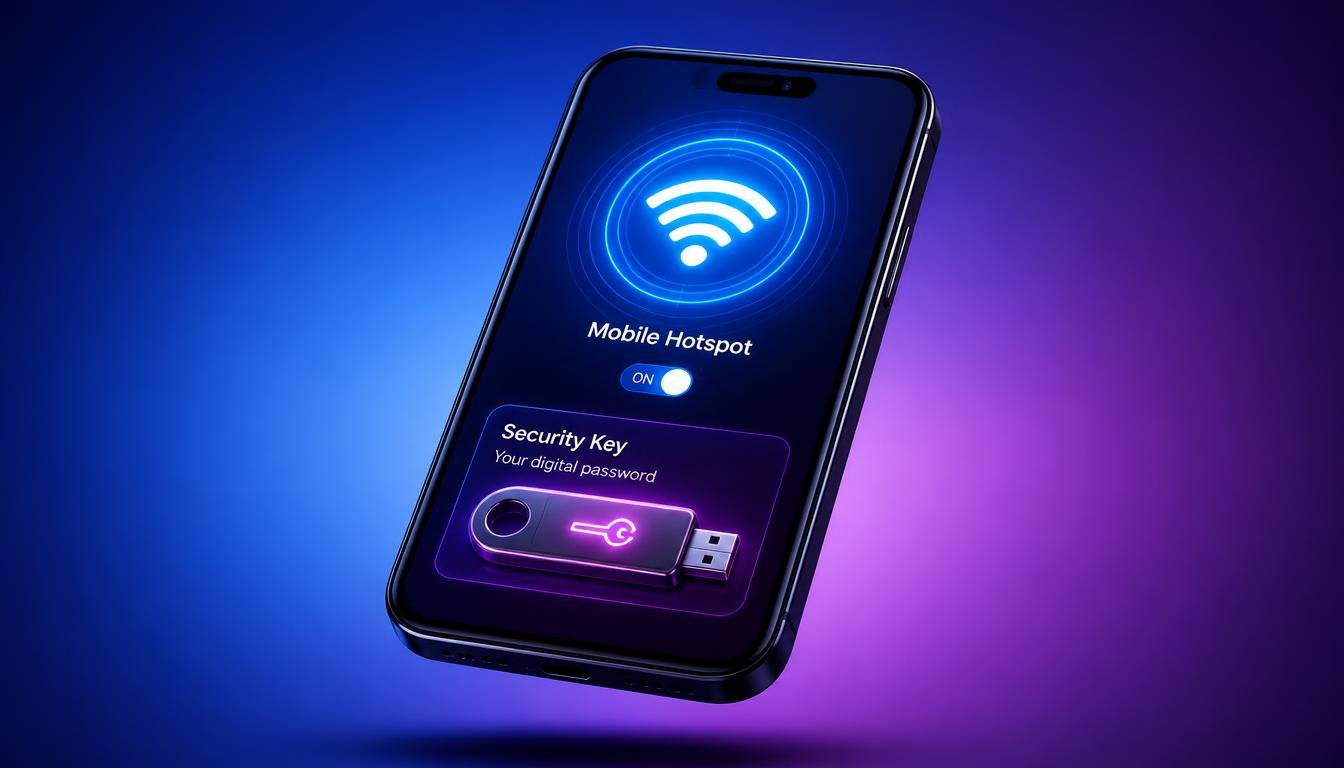
How Do I Find My Hotspot Password Fix Instantly [2026 Guide]
You switched on your mobile hotspot to share cellular internet with a laptop, a tablet, or a friend, and then the connection screen asked for a password you cannot remember typing. This is one of the most common questions device owners search for, and the answer is not the same on every phone. How do I find my hotspot password depends entirely on the operating system in your hand, whether that is stock Android, Samsung One UI, iOS, MIUI or HyperOS, or EMUI, and each brand hides the passphrase in a slightly different menu.
Quick Answer: How Do I Find My Hotspot Password Instantly
- Open Settings on your phone.
- Tap Network and Internet on Android, or Connections on Samsung, or Cellular on iPhone.
- Select Hotspot and Tethering or Personal Hotspot or Mobile Hotspot.
- Tap Hotspot Password or Passphrase to reveal the eye icon.
- Press and hold, or tap the eye icon, to display the plaintext password on screen.
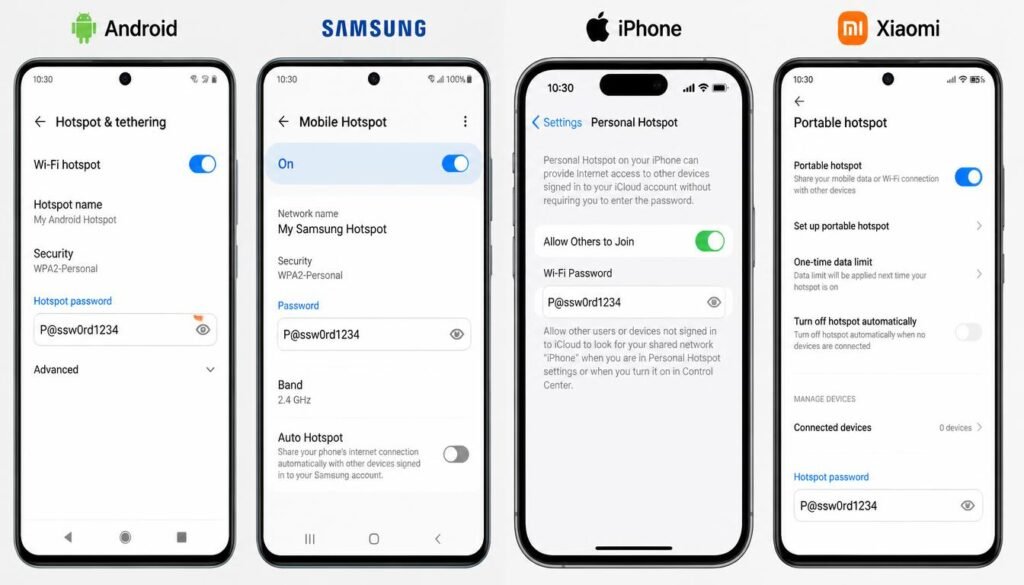
This sequence works on almost every modern phone because manufacturers store the passphrase as masked text behind a visibility toggle rather than deleting it. Once you reveal it, you can read it aloud, write it down, or generate a QR code so nobody has to type a single character.
Device Brand and OS Navigation Comparison
| Device Brand or OS | Settings Path | Default Security Type | QR Code Sharing Supported |
|---|---|---|---|
| Stock Android (Pixel, Motorola) | Settings > Network and Internet > Hotspot and Tethering > WiFi Hotspot | WPA3 or WPA2/WPA3 mixed | Yes |
| Samsung One UI | Settings > Connections > Mobile Hotspot and Tethering > Mobile Hotspot | WPA2/WPA3 mixed | Yes |
| Apple iOS | Settings > Personal Hotspot | WPA2 | Yes |
| Xiaomi, Redmi, Poco (MIUI/HyperOS) | Settings > Personal Hotspot | WPA2 | Yes |
| Huawei and Honor (EMUI) | Settings > Wireless and Networks > Personal Hotspot | WPA2 | Yes, on most EMUI 10 and later builds |
Method 1: How Do I Find My Hotspot Password on Android (Stock Android, Pixel, and Motorola)
Stock Android, the version running on Google Pixel and most Motorola phones, keeps the hotspot passphrase inside a single settings screen and does not hide it behind a separate submenu.
- Open Settings, then tap Network and Internet.
- Select Hotspot and Tethering, then tap WiFi Hotspot.
- Look at the Hotspot Password field. The characters appear masked as dots.
- Tap the small eye icon on the right side of the password field.
- The full passphrase now displays in plaintext, ready to read or copy.
If the eye icon does nothing, the phone likely runs a heavily customized Android skin from a different manufacturer. Skip ahead to the section that matches your actual brand rather than the generic Android steps.
How Do I Find My Hotspot Password When the Eye Icon Is Missing
Android masks the hotspot password by default as a screen privacy measure. Anyone glancing at your unlocked phone over your shoulder should not be able to read your network credentials at a glance, so the operating system requires a deliberate tap before revealing the characters. If your build does not show an eye icon at all, tap the password field itself, since some manufacturer skins reveal the plaintext on tap instead of on a separate icon, or check the QR code sharing option covered in Method 6, which displays the same credential without needing a visibility toggle.
If you are unsure which network name to look for before entering the password, our guide on how to find your WiFi SSID on any device explains where the name is stored on every platform.
Method 2: Where to Find Hotspot Password on Samsung Galaxy Devices (One UI Path)
Samsung renames several menus under One UI, which is the reason so many Galaxy owners search specifically for where to find hotspot password on Samsung rather than a generic Android guide.
- Open Settings and tap Connections.
- Tap Mobile Hotspot and Tethering.
- Select Mobile Hotspot.
- Tap directly on the Password field under the network name.
- Tap the eye icon to unmask the characters, or tap QR Code to display a scannable code instead of typing anything.
What is the hotspot password on Samsung by default is normally a randomly generated ten character string mixing letters and numbers, unless you personally changed it during a previous setup session. Samsung regenerates a new random password automatically only after a factory reset, not after every reboot, so your existing passphrase should remain stable between charging sessions.
Method 3: How Do I Find My Hotspot Password on iPhone (iOS Personal Hotspot Path)
Apple keeps the flow shorter than Android because iOS combines cellular data sharing and the passphrase display inside one screen.
- Open Settings and tap Personal Hotspot.
- If the toggle at the top is off, switch it on first.
- Tap the WiFi Password field directly beneath the toggle.
- The full passphrase becomes editable and visible immediately, since iOS does not mask this particular field behind an eye icon the way Android does.
- Tap anywhere outside the field to save, or copy the text using the standard iOS copy gesture.
How do I find my hotspot password iPhone questions often come from users who expected a hidden field similar to Android. iOS shows the actual characters as soon as you tap into the box, which makes this one of the fastest lookups across any platform.
Method 4: How to See My Hotspot Password on Xiaomi, Redmi, and Poco (MIUI and HyperOS Path)
MIUI and the newer HyperOS interface use nearly the same layout, since HyperOS is built on the same foundation with a refreshed visual theme.
- Open Settings and tap Personal Hotspot.
- Some builds place this under Connection and Sharing first, then Personal Hotspot as a submenu.
- Tap the Configure Hotspot option, or tap directly on the password row depending on your MIUI version.
- Tap the eye icon beside the passphrase.
- Save any changes before leaving the screen, since some Xiaomi builds discard an edited password if you press the back button too quickly.
How to see my hotspot password on Xiaomi becomes slightly more confusing on regional firmware, because Indian and global MIUI builds sometimes rearrange this menu differently than Chinese builds. If the path above does not match your screen exactly, search within Settings using the built in search bar and type hotspot to jump directly to the correct page.
How to See Your Hotspot Password on Redmi Specifically
Redmi phones running MIUI or HyperOS follow the identical steps listed above, since Redmi is a Xiaomi sub brand sharing the same core operating system rather than a separate one.
Method 5: How Do I Find My Hotspot Password Huawei and Honor Devices (EMUI Path)
Huawei and Honor phones running EMUI, or the newer HarmonyOS on select Huawei models, store the hotspot passphrase in a location that closely resembles Samsung rather than stock Android.
- Open Settings and tap Wireless and Networks.
- Select Personal Hotspot.
- Tap the Password field.
- Tap the eye icon to reveal the plaintext characters.
- On EMUI 10 and later, tap Share Password to generate a QR code instead of reading the text aloud.
Older EMUI builds prior to version 9 sometimes hide the eye icon entirely and only display the password through the QR code sharing option, so if you cannot find a visibility toggle, generate the QR code instead and scan it from a second device to confirm the network works, then check the connected device saved password list for the plaintext string.
Method 6: How to View Hotspot Password Without Typing (QR Code Method)
Every major platform covered in this guide now supports QR code hotspot sharing, which sidesteps typing entirely and avoids the risk of reading out a character incorrectly.
- Navigate to your hotspot settings screen using the brand specific path above.
- Look for a QR Code icon, usually positioned beside or below the password field.
- Tap the icon to display a scannable square code on your screen.
- On the receiving device, open the camera app and point it at the code.
- Tap the notification banner that appears to join the network instantly.
How Do I Find My Hotspot Password?
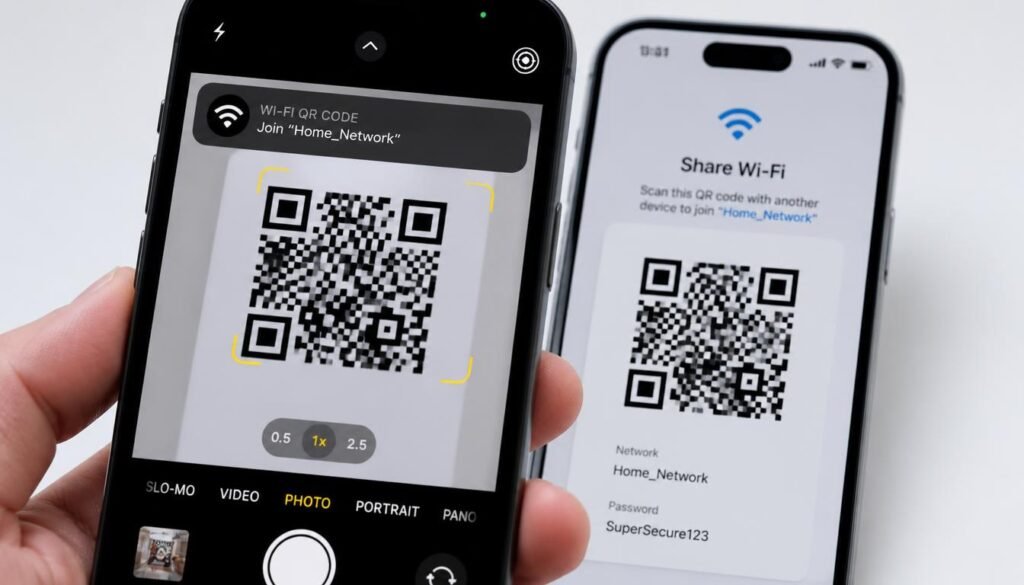
This instant QR code sharing method works because the code embeds the network name, security type, and passphrase together as encoded text, so the receiving device decodes and connects without ever displaying the raw password to the person scanning it. This is the fastest and safest option when you want to grant temporary access without saying your password aloud in a public place.
If you want to hand over access without reading out a single character, our full breakdown on how to share WiFi password across every device covers the cross platform QR method in detail.
Troubleshooting and Carrier Error Fixes
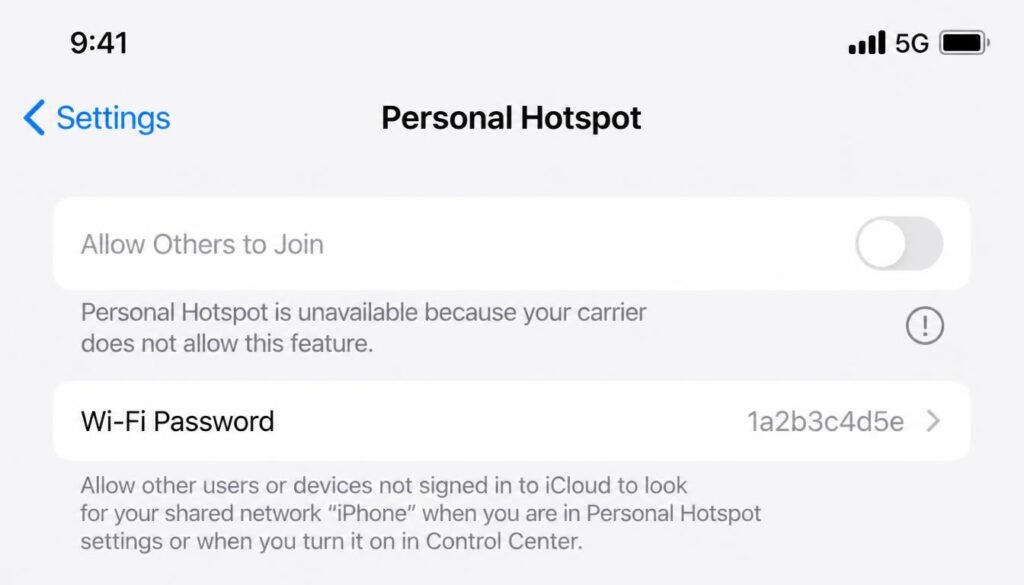
Fixing Greyed Out Hotspot Options Due to Carrier Restrictions
Carriers including AT&T, Verizon, T-Mobile, and many MVNOs sometimes disable the personal hotspot toggle entirely, or leave the toggle active while greying out the password field, when your plan does not include a tethering allowance.
- Confirm your plan actually includes hotspot or tethering data by checking your carrier account app or calling customer support.
- Some carriers require a one time activation step through their own app before the phone side toggle unlocks.
- On business or carrier locked devices, a mobile device management profile installed by an employer can also block hotspot access regardless of your personal plan.
- If the greyed out menu persists after confirming plan eligibility, restart the phone, since a stuck carrier configuration profile occasionally requires a reboot to refresh.
If a laptop refuses to join your hotspot even with the right password, our dedicated guide on laptop not connecting to WiFi walks through the saved profile and driver fixes that solve this specific case.
Resolving No Internet Connection Errors After Entering the Correct Password
A connected device that shows a WiFi icon but reports no internet access, despite a correctly entered hotspot password, usually points to a data limit, a band mismatch, or a background restriction rather than the password itself.
- Confirm the hotspot phone still has active mobile data and has not exceeded a carrier imposed data cap.
- Check whether the connecting laptop or tablet automatically switched to a different saved network with the same name from a previous location.
- Toggle Airplane Mode on and off on the hotspot phone to force a fresh cellular connection before broadcasting again.
If your device keeps rejecting the hotspot password even after typing it correctly, read our guide on common WiFi authentication issues for quick security handshake fixes.
Resetting a Forgotten Hotspot Password to a Custom Security Key
What if I forget my hotspot password is a common follow up question once you realize the default string is too long to memorize.
- Open your hotspot settings screen using the brand path above.
- Tap the password field, then select all existing characters and delete them.
- Type a new passphrase of at least eight characters, mixing letters and numbers for better security.
- Save the change, then reconnect every device that previously used the old password, since none of them update automatically.
AP Band and Bandwidth Interference
Most phones broadcast the hotspot signal on the 2.4GHz band by default because it covers a longer distance and stays compatible with older laptops, smart speakers, and budget tablets that lack a 5GHz radio. Switching the AP band setting to 5GHz or 6GHz inside the same hotspot menu increases speed dramatically over a short range but will not change or reveal the password itself, since the passphrase is tied to the network profile rather than the frequency band. If a connected device suddenly reports connected but no internet after you change bands, it is very likely a device compatibility issue rather than an authentication error, since some older hardware simply cannot see a 5GHz only broadcast at all.
If the connecting device shows no WiFi networks at all rather than just a password error, check our guide on network adapter not working to rule out a hardware or driver level block.
Frequently Asked Questions
How do I find my hotspot password on my phone?
Open Settings, navigate to the hotspot or tethering menu specific to your brand, tap the password field, and tap the eye icon to reveal the plaintext characters.
How do I find my hotspot password on Android?
On stock Android, go to Settings, then Network and Internet, then Hotspot and Tethering, then WiFi Hotspot, and tap the eye icon beside the password field
Where to find hotspot password on Samsung?
Open Settings, tap Connections, tap Mobile Hotspot and Tethering, select Mobile Hotspot, and tap the password field followed by the eye icon.
How to find other mobile hotspot password?
You cannot legitimately view the password of a hotspot you do not own or manage, since the passphrase is stored locally on the broadcasting device and never transmitted in plaintext to connecting devices. Ask the owner directly, or ask them to share the QR code instead.
How do I find my hotspot password iPhone?
Open Settings, tap Personal Hotspot, and tap directly on the WiFi Password field to view the characters immediately without an extra unmasking step.
How do I find my hotspot password Huawei?
Open Settings, tap Wireless and Networks, tap Personal Hotspot, tap the password field, and tap the eye icon, or use the Share Password QR option on EMUI 10 and later.
How to see my hotspot password on Xiaomi?
Open Settings, tap Personal Hotspot or Connection and Sharing depending on your MIUI or HyperOS version, and tap the eye icon beside the password row.
How to see your hotspot password on Redmi?
Redmi phones use the identical MIUI or HyperOS steps as Xiaomi, since both brands share the same underlying operating system.
Where can I see my hotspot password?
The password always lives inside the hotspot or personal hotspot settings screen on the broadcasting phone itself, never inside the WiFi settings of the connecting device.
How do I find my hotspot on Android?
The hotspot toggle sits inside Settings, then Network and Internet, then Hotspot and Tethering on stock Android, though Samsung and other brands rename this path as described above.
What is the hotspot password on Samsung?
There is no universal default value, since Samsung generates a unique random passphrase per device during setup, viewable through the Mobile Hotspot menu described in Method 2.
What if I forget my hotspot password?
You cannot recover a forgotten password from a locked screen without device access, but once unlocked, you can view the existing passphrase using the eye icon or simply overwrite it with a new custom password through the same settings menu.
Final Thoughts
Knowing how do I find my hotspot password saves significant time whenever a friend, laptop, or tablet needs a quick cellular connection. Whether you navigate the Connections menu on Samsung One UI, tap the unmasked password field on iOS, or display a QR code on Xiaomi and Android devices, every major operating system provides a direct path to retrieve your passphrase. If your receiving device still fails to browse after entering the correct security key, check your active mobile data allowance or toggle Airplane Mode to refresh the cellular broadcast. For broader home networking fixes, explore our related guides to keep all your household devices seamlessly connected.